Saturday, April 29, 2006

Recharge your Battery anywhere

The Splashpower solution is based around technology that uses inductive coupling as a means of power transfer - which means you don't need any wires, connectors or contacts between the pad and the device.

Electromagnetic induction is a technology that is currently employed in a wide range of applications. Applications which currently use induction for power transfer include powering electric vehicles, recharging electric toothbrushes and powering smart-tags and security tags.

The Splashpower solution overcomes previously unresolved issues in the development of inductive technology to allow you to power or charge a selection of gadgets all at the same time. Just place any device that incorporates a SplashModule™ power receiver on the SplashPad and power up. http://www.splashpower.com/products/technology.html

Friday, April 28, 2006

A newspaper for your Pocket PC


Introducing A6.Times, a user friendly electronic newspaper for your Windows Mobile device that gives you news updates in real time. Discover a newspaper like you’ve never seen before.
A6.Times is an enhanced news feed aggregator of surprising power. What sets it apart from conventional news aggregators is that it formats and displays news in a traditional newspaper format, adapted to the small screen of your Windows Mobile device.
Synchronize it anytime and then bring it with you wherever you go. And, unlike ordinary newspapers, it fits in your pocket.

Copy the link to your browser:
http://www.alien6tech.com/timesDescription.aspx

Stronger batteries for your PDA.

Bluetrade, a French company, is selling strong Batteries with capacities of upto 3300MaH available in Europe only. Prices start from 59 euros. Below is a list of compatible devices:
BATTERRY 2400 MAH for QTEK S100 S110 S200 (Imate)
BATTERRY 2400 MAH for QTEK 2020 2020i (Imate)
BATTERRY 2400 MAH for QTEK 9100 SPV M3000 (Imate)
BATTERRY 3000 MAH for QTEK 9000 SPV M5000 (Imate)
BATTERRY 2000 MAH for ETEN M500 M600 G500
BATTERRY 3300 MAH for ETEN M500 M600 G500
BATTERRY 1800 MAH for BLACKBERRY 7100t/7100v/7100x

Bluetrade's website

This card is just not a card


From PQI Taiwan comes the world's slimmest flash drive, this baby is just 3mm thick and is no bigger than an actual credit card. You might think a Flash drive of this size will have a capcity of 512MB or 1GB max, but no the U510 holds a whooping 16GB of data. It connects to the host via USB 2.0 and is compatible with Mac and Windows. It has a built in retractable cord to maintain the slim design.

The PQI U510 measures 85 x 54 x 3 mm and will be available in Iron Gray, Metallic Silver and World Cup special design with the World cup etched on the drive.Pricing and availability is not known yet.

Thursday, April 27, 2006

ActiveSync 4.2 Beta Preview

ActiveSync 4.2 Beta Preview is an early look at the latest sync software release for Windows Mobile devices.
Microsoft ActiveSync provides a great synchronization experience with Windows powered PCs and Microsoft Outlook right out of the box. ActiveSync acts as the gateway between your Windows powered PC and Windows Mobile powered device, enabling the transfer of Outlook information, Office documents, pictures, music, videos and applications from your desktop to your device. In addition to synchronizing with a desktop PC, ActiveSync can synchronize directly with Microsoft Exchange Server 2003 so that you can keep your e-mail, Calendar, Notes, and Contacts updated wirelessly when you’re away from your PC.*
The ActiveSync 4.2 Beta Preview delivers new features to improve the synchronization experience for customers.


Click Here to read more and download.

Getting the Most Out of Your Today Screen - by Brad Adrian

"I used to take my Today screen for granted, not really paying attention to all it has to offer. Then, I found out how easy it is to transform it into both a great launching pad for all of my work and a time-saving synopsis of my Microsoft Outlook Mobile applications." Read more...

Wednesday, April 26, 2006

PdaNet for Windows Mobile v1.14

Software to drive your Windows Mobile Smartphone or PocketPC Phone as a Wireless Modem for your PC - PdaNet allows your PC to go online by connecting to your Windows Mobile Smartphone through the ActiveSync cable/dock. If you own a Treo 700w or PPC/XV 6700 with any data plan, PdaNet will make it your high speed wireless Internet Service for your laptop/desktop computer instantly - no extra hardware or setup necessary, no need to kill ActiveSync or perform any tricky hacking to your device whatsoever.Current version supports tethering for Treo 700w, PPC/XV 6700, 6600 and Samsung I730. PdaNet uses the ActiveSync USB cable for high speed downloads. Bluetooth support will be added later through free update.
*this software does not come with any warranty and does not run on Macintosh.
Features:
PdaNet will make it your wireless Internet Service for your laptop/desktop computer instantly - no extra hardware or setup necessary, no need to kill ActiveSync or perform any tricky hacking to your device whatsoever.


Compatible Devices:
Audiovox: Audiovox XV6600, Audiovox PPC 6700Palm: Treo 700wSamsung: Samsung i730


I will try it with my Eten and will post a review tomorrow. Click here to download a trial.

Tips: Change Font on your PDA

Are you tired of just using Tahoma and Courier? Yes indeed, you are not limited to these two fonts only.
Using Windows Explorer on your desktop computer, navigate to c:\windows\fonts or c:\winnt\fonts folder and copy the desired .ttf files to your Pocket PC. Just place them in the \Windows\Fonts folder of your PDA and you will be able to select them in your PPC applications.

Tips:Resolve synchronization conflicts

Occasionally, ActiveSync has a problem which of two versions of a document is the correct one. For example, if you make changes to two versions of the same document, one on your Pocket PC and the other on your PC, and if you make these changes when your Pocket PC is NOT connected to the PC, ActiveSync may not be able to figure out which version takes precedent.
By default, ActiveSync is set up to expect the data on the PC to be correct. You can change this to favor the Pocket PC version of the document as follows:
Open ActiveSync on your PC, click on the Tools menu, and select Options.
Click on the Settings button to display the Desktop Computer Settings screen. The second data field on this screen is labeled "If there is a conflict:" By default, it should say "Replace Item on Device."
Click on the down arrow next to this field and select "Replace Item on Desktop."
If ActiveSync encounters a conflict, it will favor the Pocket PC version of the document and synchronize that with your PC.

Tuesday, April 25, 2006

Microsoft Developing Next Mobile OS: Crossbow

Pieter Knook, senior vice president for the mobile devices and telecoms sector at Microsoft talks to PCWorld about the next version of Windows Mobile, codenamed Crossbow. Knook also announces that "the company plans for an annual mobile OS release".

Click here to read the article.

Use CTRL+Q to completely close your programs

By default, Windows Mobile does not close applications when you tap the 'X' at the upper right corner of an application. The program disappears from the main screen but keeps running in the background.
There are two ways of taking care of this. One is that you periodically go to Start -> Settings -> System -> Memory -> Running Programs and then selecting the program and tapping stop. You can also exit the program more directly by tapping CTRL+Q on the soft keyboard. This completely closes the program and removes it from memory.

GPRS Remote Control for Smartphone

GPRS Remote Control is a communication tool that gives you the unique ability to connect to your desktop computer through the mobile phone and interact with it remotely.Dedicate design for your mobile device to remote control the PC and transfer files with phone, Support voice communications between mobile and computer,http proxy
Main Features:

* Smart network browser can browsing your computer files on your mobile device ,Transfer file to/from computer, Powerful file management functionality.
* Sending voice to computer in real time even at GPRS low bandwidth
* Support mouse left click, mouse double click, right click, Screen zoom and move, Text input
* 6-level image quality ,4-level screen resolution, support low-bits colors image transfer. Breakthrough smart caching technology compares the screen changes and updates only the difference . Channel level compression working together with smart caching dramatically cut down the bandwidth usage. Update the computer screen in real time even at GPRS low bandwidth
* High standard security with SSL encryption
* Support http proxy, Even could connect to computer when your mobile device''s connection is under a http proxy.

This tool is great but it's not free. Click here to download a trial version or buy it ($29.95)

Monday, April 24, 2006

CRYPTAINER POCKETPC LE

Cryptainer PPC LE is the totally free, lite edition of Cryptainer PPC, specially modified to meet the growing security and privacy needs of a home user. It allows you to secure your data and ensure absolute privacy. It's powerful 256 bit encryption, creates 2 MB storage (virtual card) on your device. This encrypted storage (container) can be mounted and unmounted on need. You can view, modify and hide all types of file with a single password.
Cryptainer PPC LE allows you to create encrypted partitions, that allows you to store all your data in an encrypted form within the partition, or encrypted storage spaces that when unloaded look like any other file on your Pocket PC.
You may create fixed sized storage or re-sizable storage cards. These cards can also be loaded/unloaded automatically on startup and shutdown.
In addition, to save space on your Pocket PC, Cryptainer PPC LE offers a Compression feature, where all files are automatically compressed when the data is written to storage and decompressed when the data is read from the storage.


Click here to download.

Saturday, April 22, 2006

Complete file explorer solution

The builtin File Explorer of both WM 2003 and WM5 have some limitations and one of the most obvious is that you cannot view/change file extensions. Luckily, some developpers have worked on alternative solutions, namely Total Commander.

This software has it all except the capability to transfer files through bluetooth, but it does work with infrared. It even has its own zip module.

One of the capabilities I like most is the 3 display mode it offers. There's the single window, 2 windows, and the virtual 2 window mode. Simply put, you can navigate between several windows using an arrow that shows on the top right side of the screen.

And last but least, you can perform multiple selection. I strongly recommend this software. Here's the link: http://www.ghisler.com/pocketpc.htm

Friday, April 21, 2006

A real free direct push mail service

If you really want to have a direct push mail service for free, through Microsoft Exchange, then go to this site and register. Unlike Emoze, no-deception guaranteed: http://services.mail2web.com/FreeServices/m2wLive/

Remote protect your Pocket PC

I have recently talked about a newly released application that may be in great help of you if your pocket pc device was stolen - Eye On Thief for Pocket PC. Here is one new addition to this kind of protection pocket pc application. remotePROTECT offers you Total Thief Protection including actions like notification of SIM change, Remote Kill, Remote Lock, Remote Unlock, Retrieve IMSI and IMEI pocket pc details.
If your pocketpc device is stolen and the SIM changed then built in thief protection sends SMS to the user defined telephone number. The SMS messages will include the IMEI and IMSI that is in use , if the SIM allows for the telephone to be sent then this will also be received. Whilst the SMS message is being sent the device will lock so the thief will not have access to your device.The lock screen can be configured to allow a number of retries before the device will self wipe, removing data from the SD card and hard reseting the device.

remotePROTECT Features:
* Thief protection, if the SIM is changed then a SMS (showing the IMEI and IMSI) is sent to a user defined number
* Remote Kill the device , including the SD card
* Remote Lock the device
* Remote Unlock the device
* Retrieve the IMSI and IMEI of the device
The developers from sCPsOFT said that veriosn of this application with support for Windows Mobile 5 will be released until the end of April this year. You can download this pocket pc protection application from here.

SPHelper - Smartphone Helper

What is SPHelper ?
SPHelper is a collection of useful tools to make your smartphone easy to use. Including a virtual cursor, windows/process manager, zoom/move current window, grab and paste text, etc. With the help of the virtual cursor provided by SPHelper, you can run many Pocket PC softwares on your smartphone device.
Features
• Virtual cursor. Controled by smartphone's keyboard.
• Send command to any program to control it.
• Generate menu automaticly for pocket pc application.
• Windows manager and process manager.
• Zoom/Move/Close/Confirm/Cancel current window
• And many more...


Click Here to download

Thursday, April 20, 2006

Tips: ClearType in both Landscape and Portrait mode.

Maybe you noticed that even though you have ClearType enabled, it wont work when you switch to Landscape mode. You can change this behaviour by changing a setting in the registry using a good registry editor. Remember, improper manipulation of the registry can cause your device to become instable. So be extremely careful.

Before you proceed, check that ClearType is enabled by going to Start Settings System Screen ClearType Enable ClearType.

Open the registry editor and navigate to:
HKEY_LOCAL_MACHINE\System\GDI\ClearTypeSettings. Change the value the value for OffOnRotation from 1 to 0. Make sure that Dec is set as the base model.

Soft reset your device and see the result by switching to Landscape mode.

Treo Hollywood runs Windows Mobile 5

It seems that Microsoft and Palm are determined to prolong their honeymoon. After the Treo 700W, Treo Hollywood, a smartphone factor, will soon be released and it will be using the WM5 platform. We were all expecting the device to run Palm OS. Pictures and review are available at Blogs.treonauts.

"Although the pictures below are somewhat blurred, as previous rumours indicated this model is considerably ‘slimmer, lighter and slicker’ than both the Treo 650 and Treo 700 plus it also has the benefit of ‘no antenna’ – something which I have personally wanted to see for nearly two years."

The price, according to sources, will be $300.

Wednesday, April 19, 2006

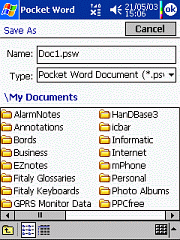
File Dialog Changer v1.65


PocketPCfreewares has a link to a very useful utility on their site. The application replaces Windows Mobile Saves As option with a more complete solution. The interface looks like the Windows (Desktop) Save as dialog. It is much more easier to browse your device using this utility than using Microsoft builtin feature. Note: The author's site is in Japanese. Just look for the text "FileDialogChanger" to download the file