Tuesday, March 03, 2015

Surfy browser automatically minimizes application bar when scrolling down a page.


My favorite browser for Windows Phone, Surfy, got a nice update yesterday. The application bar at the bottom of the browser now minimizes itself when scrolling a web page. Not that big an update, but a most welcomed one on small screen devices and bigger ones too as you get more viewing area. This feature is activated by default after installing the update. If, for some reason, you would like to disable it, you can toggle it off in the browsers settings.


Surfy is available as a free and paid app in the store. The only difference between the two is the number tabs which is limited to three in the free version.

Friday, February 20, 2015

Game Troopers releases second game for Windows Phone: "Make it Rain: The Love of Money"


Game Troopers strikes again with a new game for Windows Phone. The second title is called Make it Rain: The Love of Money, a successful title on Apple store and Google play with a combined 6 million downloads. Game Troopers first title, Tiny Troopers, has garnered 2 millions download 5 weeks after its release for Windows phone and that number is growing according to the developer.

Make it Rain: The Love for Money, is a fun and clever game. Where there is money, there's investment and some not-so legal possibilities. You start by swiping and watch the green notes pile up. The amount can reach the billions, "kili-billies, mega-billies, and beyond." However, to get these astronomical amount, you'll invest your money in "venture capital, loan sharking, or offshore drilling". In other words, keep investing or make such moves like buying off a federal judge or bribe the FBI. It's a fun game and a crazy one too. Since this is a Xbox title, your achievements are posted to the Xbox leaderboard.

And you and your parents MUST watch this trailer before getting started:


Happy Swiping

Get Make it Rain: The Love for Money free in the Windows Phone store.

Sunday, February 15, 2015

Cross-platform game Tiny Troopers for Windows Phone gets exclusive updates.

Not everyone celebrates St. Valentine and certainly not our Tiny Troopers friends because they have no love for zombies. Yesterday, Tiny Troopers received an exclusive update bringing additional levels. The new levels are not yet available on iOS and Android yet.


The developers also announced that they are working hard on a major update "with more new and exclusive contents for Windows Phone players. This includes custom suits among many other features." Game Troopers, the developer of Tiny Troopers, welcomes suggestions of "your favorites suits" on their Facebook page.


If you have not played Tiny Troopers yet, get it in the store and enjoy some zombie slaying for free.

Wednesday, February 11, 2015

Xim pictures directly from your Windows Phone camera.


Xim is a nice app for sharing photos with friends and families without giving them your phone. This is particularly useful when you're, say, attending a party and you do not want to see your phone moving around when all you want is your friends to see a picture that is either on your camera roll or your favorite cloud service and nothing else. 

Sharing a photo with Xim is done either by email or a phone number and the Xim app is not required on the phone or desktop. So you may be sharing photos to 10 friends and you are the only one with Xim app installed. Your friends will receive a link by email or text and view the photo in their phone's browser. You, as the sharer, are in control since Xim lets you swipe, pan and zoom on the photo.

As stated above, Xim lets you pick the photos you want to share from your camera roll, OneDrive, Dropbox, Facebook and Instagram. In an update published today, Xim lets you use the phone's camera to take a picture and share it right away.

This update also includes the usual performance improvements and bug fixes.

Download Xim free in the Windows Phone store.

Tuesday, February 10, 2015

Runtastic for Windows Phone gets slew of new features.


Running, walking, hiking and biking for outdoor sports; Treadmill, cardio, yoga, weight lifting for indoor sports. Whichever sports you practice, there's a tool in the store to keep track of your activities. With the advent of the fitness trackers, smart watches, fitness apps are very popular these days. Fortunately, our phones are here to help us keep track of all that and crunch the data to help us stay healthy.


One among the many apps out there is Runtastic Pro for Windows Phone. An app full of the required features to make it an excellent fitness companion. Today, Runtastic Pro just got better with the following new features:

* Heart Rate Integration: Track your heart rate with the Runtastic Heart Rate Combo Monitor (PRO only)
* Heart Rate Zones: Train in the ideal heart rate zone, i.e. fat burning, to reach your goals (PRO only)
* LIVE Tracking & Cheering: Share location & receive messages for motivation to keep pushing
* Transparent Live Tile on your start screen
* Hydration feature: See how much you should drink to recovery from dehydration post-activity (PRO only)
* BirdView in map
* Japanese Voice Coach (PRO)
* New app languages: Russian, Turkish and Polish
* Improved layout

Some of new features are available in the pro version only. Use the download links below to get the free or paid version:

Free                                            Paid ($4,99)

Thursday, February 05, 2015

Office Lens now converts pictures to PDF with selectable text.


Office Lens picked up a useful update with the ability to convert pictures to PDF with selectable text and save them to OneDrive. I strongly recommend you give Office Lens a try especially if you have to do record keeping of, say, your expenses receipts. I use Office Lens for insurance claims. My insurance company requires originals and Office Lens come in handy to save soft copies of my receipts to OneDrive.

Office Lens is free in Windows Phone store.

Wordament natively supports Windows Phone 8 devices and resolutions.


Word games are great time killers and one of the best, of not the best, just got updated today. Wordament, a Xbox Live title has been in the store since Windows Phone 7.x. As an Xbox title, players get to follow their progression and that of other players on Xbox leaderboards. As a word game, you can be a champion by either making the most words in a limited time, find the longest word to make the best score.

With the upcoming release of Windows 10, it's nice to see the already universal game get updated to take advantage of Windows Phone 8 devices and resolutions. Owners of devices like the Lumia 1520 and 1320 will love it.

Wait no more and grab the update in the Windows Phone store.

WeChat updated with short video sharing.


WeChat is a very popular cross-platform messaging app, especially in Asia. Like any messaging app of its kind, WeChat handles text, voice and video calls quite nicely to serve 400 million users worldwide. One of my favorite feature is the walkie talkie mode with up to 40 friends.

Video sharing is trending these days with almost any messaging app offering the service, not to mention social networks platforms having video sharing built in. It is no surprise to see WeChat join the party with the addition of sharing of short videos with friends during chat sessions or via Moments. Video sharing is part of the update published today in the Windows Phone store. The update also includes the ability to tag contacts so you can find them quickly.

If you don't have WeChat in your messaging app collection yet, give it a try, else get the update in the store.

Friday, January 30, 2015

Duolingo for Windows Phone is now ready for schools with progress tracking and sharing.


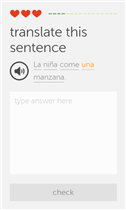
There are quite a few language learning apps in the Windows Phone store and even fewer manage to stand out of the lot. Duolingo is one of these apps. Besides being cross platform, Duolingo brings you the experience of learning while having fun. Similar to a game, the less mistakes you make earns you hearts. Lose all hearts and you start the level again. It really is a fun way to learn French, German, Portuguese, Italian, Irish, Dutch, Danish and, of course, English.  

Initially, Duolingo was designed for your own personal learning on your phone wherever you are. With today's update, the learning gets to a new level. The app is now capable of tracking students progress. A feature that makes Duolingo school-ready as students can now share their progress with their teacher, or kids with their parents. 


To enable progress sharing, both parties must have the app installed. Go into the menu and tap "progress sharing" and you will see two sharing options: email field and a field for section or class if provided by a teacher. Add any information on that screen and tap "save changes". After enabling progress sharing, the parents, teacher or friends simply login to Duolingo's dashboard to track the student's progress. It is that easy.

If you're a teacher or student, go into the Windows Phone store to download Duolingo for free.

Thursday, January 22, 2015

How to send and receive WhatsApp messages right from your computer browser?

The cross-platform free messaging app got updated today on Windows Phone and other mobile platforms as well. This update brings the ability to send and receive messages right from your computer, Windows or Mac. But you will need Google Chrome installed. This new feature works with the following mobile platforms: Windows Phone, Android, Blackberry, Nokia S60 and Blackberry 10. Besides Chrome on your computer, the latest version of WhatsApp itself must be installed on your device. It is available in the Windows Phone store for free.

Launch Google Chrome on your computer and enter the following address: web.whatsapp.com. Launch WhatsApp on your Windows Phone and tap "whatsapp web" in the menu. Use the built in code scanner and point it towards the code generated in Chrome browser. A screen instantly appears with your conversations and you can initiate new ones as your full WhatsApp contacts are also available within Chrome. If you're concerned about privacy, don't be. The extension only mirrors WhatsApp on your phone. So everything is actually taking place on the phone. Users will have to go through the code scanning procedure each and every time they want to use WhatsApp on their PC.
Your phone still needs to be powered on and connected for this to work. It is an extension and nothing more. The advantage it offers is the ability to send and reply to WhatsApp messages on your PC without having to stop whatever work your doing to pick your phone to interact with WhatsApp. My only issue is that the connection is lost when the phone goes in stand by mode. How do you like WhatsApp Web?

Wednesday, January 21, 2015

Podcast+ Pro gets image performance improvements and notification when pressing back button.

Podcast+ Pro is currently free for a limited time to celebrate the New Year. It was made free last week. I was using the default Windows Phone Podcast app before and my major complaint about it was how downloading several podcast simultaneously was an awful experience. Fortunately, Podcast+ Pro handles multiple downloads well. I'm enjoying the new experience now.

Podcast+ Pro was updated today with the following features:

  • Added: notification when pressing the back button in main page.
  • Improved: performance improvements for the image.
  • Improved: playback control panel in the upnext screen and the episode screen.
  • Improved: the slider in the playback control panel.
  • Fixed: some known bugs. 
Download Podcast+ Pro as it's still free in the Windows Phone store.

Tuesday, January 20, 2015

Drive a Renault Alpine A110 and Lykan Hypersport in Gameloft's Asphalt Overdrive.

 
Can you afford a $3.4 million car? That's the price of the Lykan Hypersport, a car I will never drive in my lifetime. But thanks to an update to Asphalt Overdrive, i'll get to enjoy seeing the car on my device in Gameloft's world. The Renault Alpine must be as expensive or maybe even more. The car was produced in 1961 and is a piece of collection.

Along with the addition of the two new cars and some bug fixes, here's what is new in this update:
  • Joyride Race: How long can you last against the clock? Keep hitting Checkpoint Gates to survive! You can even use cars above your level in this brand-new game model!
  • New Storyline and Tutorial: Learn to master Boosts and the Combo system to score 3 Stars on every mission.
  • Open Gangs: You can now allow any player to join your Gang instantly!
  • Bug fixes & Optimizations: We have corrected bugs with Energy Refills, fast swipes in the Garage, and other small issues. We also improved responsiveness, and the cars can now be moved in the air!
Asphalt Overdrive is available free in the Windows phone store with in-app purchases.

Facebook Beta for Windows Phone updated with improved Most Recent page and more.

 
Facebook remains by far the world's largest social network despite attempts by Google with its Google+ which never managed to even make a dent into Facebook's popularity. IMO, Google+ only managed to become the largest gathering spot for the fan boys of the ad company.

Meanwhile, on the Windows Phone platform, the beta version of Facebook has been updated with a few improvements and fixes. If you're not aware, Facebook beta is an app Microsoft uses to test new features before they make their way to the official app. Both apps are available in the Windows Phone store. Use the links at the end of this article to download.

What's new:

  • Improvements to the Most recent page.
  • Improvements to News Feed story templates.
  • Fixes related to People Hub content.
  • Fixes to address issues with sharing partners.
Download Facebook Beta in the Windows Phone store.

Download the official app here.

Clock O' Matic for Windows Phone gets customized live tile, transparent analog and digital clock.

If you're out there looking for a good time app for your Windows Phone Phone, I suggest you give Clock O' Matic a try. It's an all-in-one app at the price of free in the store. At that price you get a clock, alarm, stopwatch, countdown timer, a live tile clock and a world clock. All that without ads. 

It seems the developer took a lot of inspiration from Android Lollipop clock with "changing shades and elegant design". Note sure I'm in for an Android experience on my Windows Phone, but the app is useful nonetheless as any app of its kind. Take the live background for example. It is not fluid and seems to be in a loop mode, you can tell by watching that the animation restarts every 15 seconds or so. But I suspect it is a OS limitation. 

And there are these three dots at the bottom right of the app that takes you into the app settings. This is plain ugly, so Android. While I understand the developer took it's inspiration from Google's clock for Android, inspiration does not mean copying or mimicking. Google's clock is not the most beautiful app on Android either, unlike Timely.

There seems to be some issues with the global clock too with cities listed more than once. Some big cities are missing: Washington, Seattle, Beijing, Calgary for example. Once you found the city, add it to the app home screen for future reference.

The alarm clock has got the time picker which makes it more convenient to set an alarm time. The analog design is not user friendly and I had a hard time to set an alarm with it. To make things simple, I suggest that this big clock be removed and make the time picker the default.
If the developer is reading this, I hope he/she will take my critics positively. Clock O' Matic is a nice app and will definitely work better with some improvements, especially on the design front. Even the app icon is similar to the Android version of the app.

Clock O' Matic has also been updated today with customized live tile with transparent analog and digital clock. 

Download Clock O' Matic free on the Windows Phone store.

Monday, January 19, 2015

Spotify update brings "bold and beautiful new look" and more localized content.

Music services like Spotify and Pandora are not officially available in my country. But I do get to enjoy them, at least Pandora, on my devices using a VPN service. It is, however, not the best of experience. Up until the service is made available to Mauritius, I have no choice but to listen via a web browser on my notebook. 

That said, the official Spotify app for Windows phone got updated today with with a new design, a way to better organize your music collection. The browsing feature has also been improved to deliver more relevant and localized content. 

What's new:

  • Spotify has a bold and beautiful new look: playing your favorite music has never looked so good.
  • Your Music on Windows Phone: Helps you save, organize and browse your music collection.
  • Updated Browse feature: delivering even more relevant and localized content.


Spotify subscriber can pick up the update in the Windows Phone Store. To lean more about Spotify, check out their website.

Sunday, January 18, 2015

HealthWeight for Windows Phone gathers health facts from your Withings Scale.


Withings Scale is a wireless device for tracking your weight and if you happen to own one and use a Windows Phone, HealthWeight is an app you should get to track your data from the Scale. Beautifully designed, HealthWeight is a third party app developed by Valentin Michalak and Julie Grienenberger, a fellow Windows Phone MVP. The latter had a discussion with the Withings team about getting an app out for Windows Phone. Unfortunately, Withings was not at all inclined into making one. Fortunately, Julie and Valentin got together to fill in and bring a third party app for Windows Phone users. And Windows Phone developers excel at making such apps, even adding features of their own that makes official apps pale in comparison. Don't believe me? Check the reviews of Health Mate, Withings' official app for Android, on the Play store.

Thanks to HealthWeight, owners of Withings Scale WS-50 and WS-30 will be able to effortlessly track their weight and other health achievement on their Windows Phone. Besides owning one the above-mentioned scales, a free Withings user account is also required. The app will let you create one if you don't. 

The app is available both in French and English. The overview in the store lists the following features:

  • Possibility to view most important information and your goal in a dashboard.
  • a "my account" page with important healthy facts and funny statistics like the number of times you used your scale.
  • Many surprises.
HealthWeight is available free in the Windows Phone store. Julie Grienenberger stated on her website that the team is working on making HealthWeight even better. To me, this app would be perfect with Microsoft Band support. If health tracking is important to you, HealthWeight will be your best companion to reach your goals.

Saturday, January 17, 2015

Telegram Messenger gets experimental stickers.

I do NOT use Telegram Messenger. With that said, the yet another multi-platform messaging app got an update to experiment stickers on Windows Phone 8 and 8.1. Typing an emoji will reveal a selection of matching stickers users can choose from. The update logs mentions the availability soon of the dozens more. 

If you're there looking for yet another secure messaging app, check out Telegram Messenger. I'm going to finally sign up and start using it. I had the app loaded on Windows Phones since it's release. Telegram Messenger is a free download in the Windows Phone store. Interestingly, it still has the beta tag.

Thursday, January 08, 2015

Tubecast updated with 480p 60fps video, HD audio and more.

Tubecast is an excellent YouTube client with great support for Chromecast, AirPlay and DLNA. Google's proprietary dongle that lets Android and iOS users project media on their phones or tablets to a TV. The Windows Phone app has been getting better and better. When it was first released, all it could do was to play a video at a time. Tubecast has improved a lot since and is getting more mature and interesting if you own a Chromecast dongle.  

Tubecast was updated today with a slew of features and bug fixes. The most noteworthy features are support for 480p with 6fps and faster app launching. See the full change log below:


  • New video quality: 480p SD
  • New Audio download quality: HD
  • Faster start-up
  • Downloaded files disappearing > bug fix
  • New DLNA smart TV support: Sony Bravia
  • Optimization of network data consumption
  • PIP follows the side menu on opening
  • Bug fixes
Tubecast is a free download in the Windows Phone store and is limited to 20 casts. You can unlock this to cast more videos and support the developer by buying the pro version for $1.99.


Monday, December 15, 2014

Glance Screen now supports lockscreen photo as background.

Glance Screen is a Lumia exclusive app that lets users check messaging, email, Facebook, Twitter notifications without powering up the screen. More apps are supported and can be added to Glance Screen depending on your liking and needs. The app was updated today with support for background image. The image that you choose as your lock screen background will also apply to Glance Screen, making the latter more visually appealing than the standard black background. A restart is required after installing the update.

Download the update from the Windows Phone store

Sunday, December 14, 2014

Facebook Beta gets bevy of improvements.

Facebook Beta lets you try new features before they are rolled out to the official Facebook app for Windows Phone. This is common practice nowadays on Windows Phone and Android, where developers reach out to early adopters to test new upcoming features before releasing them to the masses. That's what Facebook Beta is for. Anyone can opt in and provide feedback; just hit the link at the end of this article.

Today's update is a list of improvements. Test them out and remember to send your feedback in the store. 

What's new:
• “Top Stories” newsfeed and improved newsfeed ranking
• Improved “Most Recent” newsfeed
• More newsfeed content
• Profile timeline improvements
• Group feed improvements
• Event feed improvements
• Page feed improvements
• General bug fixes

• Performance improvements

Saturday, December 13, 2014

Skype Qik now lets you move messages between conversation; special holiday surprised added.

I have never been a fan of Snapchat, so it's no surprise that Skype Qik is there on my devices and has never been used if not for a few tests when it was released. If, unlike me, you're a user or fan of Skype Qik, then head over to the store as there is an update waiting for you. Maybe the changes listed below will make sense to you and improve your Qik, say "Quick", experience.

As mentioned in the title, the Qik team included a special holiday surprise in this update. It consists of falling snow flakes  upon launching the app. Don't worry, the flakes go away after a few seconds.

Here's what is new in this version of Skype Qik:

  • Qik Fliks are here. (Just in case you missed them in the last update).
  • New menu lets you delete, save, or send your message to another conversation.
  • PLUS, a special holiday surprise!

OneDrive gets improved UI and all photo views.

Microsoft OneDrive app for Windows Phone has been updated today with a interface redesign after the last one got negative feedback from users. The UI is much more polished and refreshed. Then there is the addition of an all photos view, which does exactly what its name implies: display your entire photo collection on one screen.

Here's what's new in OneDrive version 4.5:

  • UX updates and improvements.
  • All photos view.
  • Search updates for personal and work accounts.
  • Shared with ME and Recent views for work accounts.
  • Access to your Recycle Bin, so you can view and restore personal and work items.
  • A new page for viewing the properties of personal files.
  • Easy access to app ratings from the settings menu.
  • Bug fixes and performance improvements.

Tuesday, December 09, 2014

Unishare update adds Cortana integration and fixes Facebook errors.

After Microsoft released Windows Phone 8.1 preview, the first thing the community discovered was the removal of the one feature that was unique to the platform: The Me tile sharing. The latter was capable of sharing to multiple social networks with one tap or click. Thanks to the dedicated developers, we now have Unishare to fill in. And it does that quite perfectly. So, if you haven't heard of Unishare, use the link at the end of this post to download from the store.

Unishare is a must have on all my my Windows Phones. Today it was updated with a bunch of fixes and improvements as listed below:

  • Fixed message for Facebook post error.
  • Fixed error where Facebook pages do not get loaded automatically after connecting.
  • Added Cortana integration (English) with continued voice interaction in app.
  • improvements on the lock screen prevention function.
  • Other bug fixes.

Friday, December 05, 2014

VLC for WP beta is available to those who signed up.


This is great news for the Windows Phone fans as the VLC player has finally made its way to Windows Phone. Currently, only the first 1000 users who signed up for the beta have access to it. For those who did not, be patient and while VLC maybe visible to you in the store, you won't be able to download it. Again be patient until it gets out of beta or the team working on VLC decides to open up the beta to more users.

For the 1000 lucky ones, grab VLC beta in the store and remember to send your feedback to the team. As of now, the big main issue everyone is facing with the beta is with sound. There's no sound at all when watching a movie. 

Thursday, December 04, 2014

Tiny Troopers for Windows Phone released.


Last week I blogged about a game start-up called "Game Troopers" who announced the imminent release of three games for Windows Phone and they did not stop there, further announcing a publishing service to help developers port their games to Windows Phone. Game Troopers has today announced the release of one of their successful titles, Tiny Troopers.

Tiny Troopers are actually tiny soldiers you drive through 30 missions. These small guys are armed and get stronger as you take down enemies, blow up buildings, save and protect civilians. And your enemies won't make things easy, stay away of the land mines. 

Tiny Troopers is a bunch of cute, adorable little buddies that run around shooting things.  What else could you ask for?” said Game Troopers CEO, Jesús Bosch. “The game was so popular on iOS and Android that we had to bring it to Windows Phone and make it our first release. We know people are going to love it.

Tiny Troopers is the first game ported to Windows Phone by Game Troopers and it is Xbox enabled. As such, players will be able to track their achievements. The best part is that the game is available globally and free on Windows phone.

Download: Windows Phone store

Tuesday, December 02, 2014

CNN app for Windows Phone gets updated design and James Earl Jones' "This is CNN".

It's been a while since the CNN app was last updated. Today, the round-the-clock news organization was updated to version 2.0 with a new design. I particularly appreciate the addition of the distinctive sound of Mr. James Earl Jones saying "This is CNN". On launching the app, you will get to choose to enable or disable this announcement. Of course you can change this in the app settings.

Check out the full change log:

  • Watch CNN live TV anytime (with TV provider sign-in)
  • Updated design with access to additional content.
  • Email and social sharing available
  • Minor bug fixes.
Get the update in Windows Phone store.