Friday, September 09, 2011

RWC 2011: The free official Rugby World Cup app.

Unless you've been on vacation on a distant planet, you probably know that the Rugby World Cup kicks off today in New Zealand. While you may not be able to go there to attend all the games or watch them on TV, the free RWC 2011 app will prove very useful. 


With it you will be able to get the latest news, get live match coverage  including stats and video highlights wherever you are. For those who are lucky enough to be there, the app will provide you information about nearby events, stadium locations, seating plans and facilities.


Whether you're in New Zealand or elsewhere and you're a rugby fan, this app is definitely a must have.


Download link: http://windowsphone.com/s?appid=72f30269-c0ea-4dff-88fa-6faadc26746d

Friday, September 02, 2011

Microsoft/HTC unveils two new phones with Windows Phone 7.5.


Microsoft and HTC have officially unveiled two new phones powered by Mango, the latest major update of Microsoft's mobile operating system. Mango is not officially out yet as device manufacturers are busy customizing it for release in October. As of now, HTC is the second manufacturer to reveal their starting lineup. Fujitsu is the first manufacturer to have launched a Windows Phone Mango in Japan recently. With October only a month away, we should expect to see more and more devices. Now back to HTC and their starting lineup.
The first of the devices is the HTC Radar crafted from a single piece of polished metal. The radar sports a 3.8" WVGA capacitive touch screen, a 1 GHz Qualcomm processor, and a pitiful 5MP camera. Unfortunately, there is no release date. I almost forgot, the Radar is white.
The HTC Titan plays at another level with a huge 4.7" touch screen, a 1.5 ghz processor, an ultra-slim 9.9mm unibody contoured design. The Titan has a 8MP camera.

For me, the choice between these two devices is quite obvious. The white color of the Radar is already a repellent. But it's nice to see that both devices have front faced camera. So Skype should soon make its way to Windows Phone Mango.

Now, has anyone seen a Nokia out there?

Source: www.Microsoft.com/windowsphone/en-us/cmpn/HTC.aspx

Wednesday, July 20, 2011

A free version of IM+ now available for Windows Phone.

An ad-supported version of the multi-platform messaging app is now available for download on Marketplace. This is a great move from the IM+ developers. They had a similar strategy on Android.The paid version is now called IM+ Pro.

I started using IM+ today because I missed being able to chat via Skype on my Windows Phone. Since Microsoft acquired Skype recently, I expect to see the latter deeply integrated into Windows Phone sometime in the future. When that happens I'll use IM+ for Google Talk...until Google comes up with a GTalk client.

IM+ Messenger is free on Marketplace.

Thursday, July 14, 2011

GroupMe comes to Windows Phone.

GroupMe is a nice groups messaging app that works with data or plain SMS. You basically setup a group on your phone and start group conversation with friends. GroupMe lets you create as many groups as you want and assign a unique phone number to them. Any member of the group can initiate a group call by just dialing the number.

This is the first instalment of GroupMe. Expect more features to be added in future updates.

GroupMe can be downloaded free on Marketplace.

Wednesday, July 13, 2011

Keep track of your borrowings and lendings with IOU.

How many times you borrowed/lent money or anything else and forgot about it? It happens often, way too often. Well, you can put an end to this and use your Windows Phone to keep track of your belongings and, equally important, what you've borrowed. Chances are that your friend is also is using the same app. IOU is just the app you need to keep track of those and it's free on Marketplace.


Download: http://social.zune.net/redirect?type=phoneApp&id=e35eb877-1ba4-e011-986b-78e7d1fa76f8

Source: http://wmpoweruser.com

Wednesday, July 06, 2011

IM+ upgrade adds Windows Live Messenger; $5 cheaper.

A few weeks ago, IM+ Messenger made its way to the Windows Phone Marketplace amid rumors that Microsoft has approved the multi-messenger but has blocked Windows Live Messenger. The good news is that version 1.1 includes Messenger and a $5 drop in the price.


IM+ was initially priced at $9.99 and while customers will appreciate the drop, it still remains an expensive application.


Download: http://social.zune.net/redirect?type=phoneApp&id=86a45097-5bdb-df11-a844-00237de2db9e

Tuesday, June 28, 2011

Kik Messenger now available in Marketplace for free.

The 4-million users strong messaging platform is now available for free on Marketplace. The popular app lets you do group chat, picture sharing and supports push notifications. 


Check out Kik Website: http://www.kik.com/

Download: zune://navigate/?phoneappid=432c8fec-569c-e011-986b-78e7d1fa76f8


Source: WMPoweruser.com

Monday, June 20, 2011

Expensive IM+ Messenger ($9.99) for Windows Phone receives Microsoft seal of approval.

The popular IM+ Messenger has got the Microsoft seal of approval and is now available on Marketplace for $10. While this price is grossly exaggerated, there is not even a trial. Plus I can't even buy it since Marketplace remains inaccessible to Mauritians. But wait, why do I have to buy this when I have it already on my iPad and Nexus One. IM+ for the iPad and Android is no match to the Windows Phone version in terms of pricing. Both platforms sell it for the unbeatable price of $0.00. You can also get the Pro version on Android for $9.99 if you need an ad-free version. So, who do we blame for this: Microsoft or Shape Services? All I know is that I'm starting to see some sites publishing price comparisons between Microsoft and Apple stores. Microsoft has the lead for the most expensive apps. Microsoft, I think it's high time you review your prices.


Download IM+
Source: Pocket Now

Recently released Evernote gets updated to version 1.1.

Last week we saw Evernote finally makes its way to Windows Phone Marketplace. For those of you who just came back from Mars, Evernote is a nice app that lets you take notes, recordings and sync all that to the web and make your ideas accessible on any device or PC. Evernote is now again making the headlines with an update already posted to Marketplace. According to a blog post, "We’ve published an update for Windows phone 7 (V. 1.1). This version addresses the “white screen” problem some reported. Please check for updates to try the latest version." I have not experienced this issue on my HTC Mozart, but an update being an update, I have no choice but to download it.


Source: Evernote Blogcast

Friday, June 17, 2011

Evernote makes it to Windows Phone.

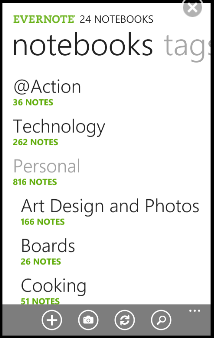
Evernote, the coolest note-taking app is now available for free on Marketplace. I'm particularly excited by this because I now have it running on all my devices and since Evernote saves my notes to the cloud, I can access them wherever I am and no matter which device/platform I'm using. It is also possible to download entire notebooks for offline access if you're a Premium subscriber.


Evernote takes full advantage of Windows Phone Metro UI and makes taking notes a breeze.


Learn more about Evernote for Windows Phone.


Evernote is free for download here.

Thursday, June 16, 2011

Test the quality of your SharePoint site with Site Checker.

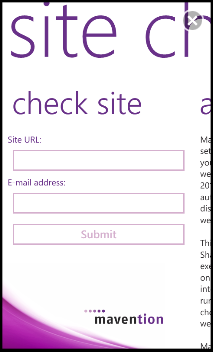
SharePoint 2010 Site Checker is a must have application for SharePoint Site administrators. Site Checker is set of automated tools that will test the quality of your internet facing SharePoint site right on your Windows Phone. "This version executes only site checks and page checks on the homepage". Mavention, the developer behind Site Checker, wants to "know if you are interested in scanning a complete site or in running the tool on premise so that you can check the quality of your internet-facing website before it is published online."


Site Checker is free to download on Marketplace.

Tuesday, June 14, 2011

Share your photos in one place, in real-time with LiveShare.

You've been to a great party this week end with your friends, family and, besides the abundance of drinks and foods, there were also a lot of flashes around emanating from cameras. So you and your friends have decided to capture the best moments of the party. What next? Some of the pictures will end up on Facebook but most of them will remain on that camera and most likely be moved to that huge TB size external hard disk sitting next to your laptop and never to be viewed again. That is because you have not looked at LiveShare yet.


LiveShare is a free app for Windows Phone that lets you share your photos in one place and in real-time. This way you do not have to chase them around. Real-time also means you can see what your loved ones are actually doing at the party. And LiveShare is very easy to use besides being free. Just open the app on your phone, start a photo stream, invite your friends and family to share photo into your stream. Pretty simple. The streams you create can only be viewed by people you invite or they invite.


LiveShare is a free app that can be download at zune://navigate/?phoneappid=7daafbde-1f2f-e011-854c-00237de2db9e


Learn  more at www.liveshare.com


Thursday, June 09, 2011

Shutdown of Windows Mobile Marketplace website and My Phone service.


Microsoft will discontinue Windows Mobile Marketplace website starting July 15, 2011. What that means is that owners of phones running Windows Mobile 6.x will no longer be able to browse the mobile website to download and purchase apps. However, this move does not affect the Marketplace application already installed on Windows Mobile 6.x phones. Users will still be able to browse, buy or download applications directly on their devices.


Along with the Marketplace website, Microsoft is also shutting down the My Phone service on October 6, 2011. Data currently stored on My Phone will be moved to Windows Live Skydrive which is Microsoft free online storage. Contacts, Calendar, text messages and photos will be moved to SkyDrive.  Videos, music, documents and favourites will not migrated, so it is the responsibility of the user to migrate those to a PC. The My Phone website will no longer be available on October 6, 2011. However, Microsoft will continue to store users’ data for one year and that same data can be shipped upon request until October 5, 2012.


Wednesday, June 01, 2011

Check out this app: Photo Crop

Crop, rotate and flip your photos for free on your Windows Phone.

Photo Crop | zune://navigate/?phoneappid=1710a949-f151-e011-854c-00237de2db9e


Sent from my Windows Phone 7

Friday, May 27, 2011

Free SPB TV 2.0 for Windows Phone released.

The prolific SPB software strikes once again with the release of SPB TV 2.0, a free application that lets you stream more than 150 TV channels from more than 20 countries without any subscription required. Users are able to choose which channel they want to watch using the channel selection screen which also provides all the "needed information about the running TV program including a screenshot and TV guide information".

*** SPB TV for Windows Phone 7 Main Features *** 
- More than 150 TV channels from more than 20 countries, subscription free 
- Unique TV browser with fast channel launching and switching 
- Integrated TV Guide with a list of current and upcoming TV shows 
- Video-on-demand 
- Network bandwidth fluctuations support 
- Onscreen controls
Download SPB TV at Microsoft Marketplace http://social.zune.net/redirect?type=phoneApp&id=5bead4b5-b65e-e011-854c-00237de2db9e 

Read the full press release after the break.

Wednesday, May 25, 2011

See the next Windows Phone OS.

Press release: Microsoft Previews Next Release of Windows Phone

REDMOND, Wash. — May 24, 2011 — Microsoft Corp. today previewed the next major release of Windows Phone, code-named “Mango,” through a series of media events around the world. “Mango” will deliver more than 500 new features to push the boundaries of the smartphone experience around communications, apps and the Internet. The “Mango” release will be available for free to Windows Phone 7 customers and is scheduled to ship on new phones beginning this fall. More details on device update timing will be provided closer to availability. Windows Phone will also add support for additional languages, expand access to apps by launching Windows Phone Marketplace in new countries, and partner with new OEMs to enable expansion to new markets.*

“Seven months ago we started our mission to make smartphones smarter and easier for people to do more,” said Andy Lees, president of the Mobile Communications Business at Microsoft. “With ‘Mango,’ Windows Phone takes a major step forward in redefining how people communicate and use apps and the Internet, giving you better results with less effort.”

Communications: Easier to Connect and Share

The smartphone experience can be complicated by a sea of disconnected apps and accounts as people attempt to keep pace with all the ways they communicate — from calls, texts, email and instant messages (IM) to status updates, Tweets, check-ins, photo posting and tagging. To help people stay on top of that growing complexity, the “Mango” release organizes information around the person or group people want to interact with, not the app they have to use.


Threads. Switch between text, Facebook chat and Windows Live Messenger within the same conversation.

Groups. Group contacts into personalized Live Tiles to see the latest status updates right from the Start Screen and quickly send a text, email or IM to the whole group.

Deeper social network integration. Twitter and LinkedIn feeds are now integrated into contact cards, and “Mango” includes built-in Facebook check-ins and new face detection software that makes it easier to quickly tag photos and post to the Web.

Linked inbox. See multiple email accounts in one linked inbox. Conversations are organized to make it easy to stay on top of the latest mail.

Hands-free messaging. Built-in voice-to-text and text-to-voice support enables hands-free texting or chatting.
A Smarter Approach to Apps


Wednesday, May 18, 2011

Flory is no more. Developer cuts development.

I blogged about Flory a few weeks ago in this post as being the first multi protocol messenger app for Windows Phone. Since then I have been using it and it has served me well. Unfortunately, Flory has disappeared from MarketPlace. The developer has decided to remove it from MarketPlace but will keep the server running "until at least IM+ is released...". I've learnt from a blog post at www.flory-im.com that the developer "was looking for an instant messenger for his new Windows Phone. Since there was no messenger, he decided to develop his own, to motivate known messenger developers of other platforms like WhatsApp, IM+ etc. to finally release their messengers for the Windows Phone platform, too. And of course, to have an instant messenger in the meantime". 


According to the blog post, IM+ is working to get a beta version released this month and Kik Messenger has been announced during MIX developer conference. Read Flory blog post here.


Note that neither IM+ or Kik Messenger are available yet in MarketPlace. Those who downloaded Flory can still continue use it until the Flory folks shut down the server.

Tuesday, May 17, 2011

Check out this app: Appa Mundi Tasks


I have seen a lot of rant and request for a Task application into Windows phone. So I decided to look for one on MarketPlace and there are quite a few out there. Among them Appa Mundi Tasks, developed by Appa Mundi Ltd. It is not free - the app costs $3.99 - and a seven days trial is available for download.

Appa Mundi Tasks can be used as a standalone app in case you do not have an Exchange Server 2003 or later. But if you have a need for an online solution so you can create, modify and backup your Tasks, you can always synchronize your list with Hotmail To-Do. That way if you lose your phone, your Tasks list will remain available online. You should already have Hotmail To-Do.

To setup sync between the phone and Hotmail To-Do, open Appa Mundi Tasks on your Windows Phone, tap “...” > Settings > Synchronization Settings. Enter your Windows Live ID or Exchange server credentials. Contact your Exchange server administrator if you do not have this information. For the server name for hotmail, type “m.hotmail.com” and check the “server requires encrypted (SSL) connection”. Validate and start filling your list and synchronize with your Exchange/Hotmail server. Unfortunately, there is no way to auto-synchronize. To view your Tasks in Hotmail, login to your account online and open the Calendar and look under the Hotmail To-Do tab.

Appa Mundi Tasks is a simple to use task app. See list of features below.


Appa Mundi Features:
View your Tasks by due date 
View all Tasks by category
Create new Tasks on your Windows Phone
Edit and Delete existing Tasks
Assign Tasks to categories.
Send status reports via email (Not available in trial)
Synchronize with Microsoft Exchange Server 2003 or later or Hotmail To-Do
Live tile shows number of active Tasks (Not available in trial)
In application reminders (Not available in trial)
Supports recurring Tasks
Keyword search

Download a trial or full version here.

Tuesday, May 10, 2011

Microsoft to acquire Skype.

It's now official, Microsoft is acquiring Skype for $8.5 billion, the largest acquisition made by the software giant. The new Microsoft Skype division will have Tony Bates, Skype current CEO, as its president and he will report directly to Steve Ballmer.  


"Skype will support Microsoft devices like Xbox and Kinect, Windows Phone and a wide array of Windows devices, and Microsoft will connect Skype users with Lync, Outlook, Xbox Live and other communities. Microsoft will continue to invest in and support Skype clients on non-Microsoft platforms.

"Skype is a phenomenal service that is loved by millions of people around the world," said Microsoft CEO Steve Ballmer. "Together we will create the future of real-time communications so people can easily stay connected to family, friends, clients and colleagues anywhere in the world."

Read more @ http://www.microsoft.com/Presspass/press/2011/may11/05-10CorpNewsPR.mspx

Posted on the go.