Showing posts with label Twitter. Show all posts

Wednesday, November 15, 2017

UniShare for Windows updated with minor changes and bug fixes.


Like me, you probably have a presence on multiple social networks and sharing to multiple platforms can be cumbersome, but thanks to apps like UniShare, this task is made easy. UniShare for Windows lets you share anything in a few clicks. In its free form, UniShare supports sharing to Twitter, Facebook and LinkedIn. But if you consent to paying a few bucks, you can unlock other features, making it one of my favorite apps on Windows 10. UniShare is also available on Android. It is really cool and a time saver to be able to share my blog posts to the world I just a few clicks.

Today, the Windows version of the app has been updated with the following features:

·       Some minor changes needed because of the Creators Update for Windows 10.

·       Removed Geeklist.

·       Bug fixes.

UniShare is available on the PC, Mobile, Hololens and Hub. Check it out in Microsoft store.


Saturday, July 30, 2016

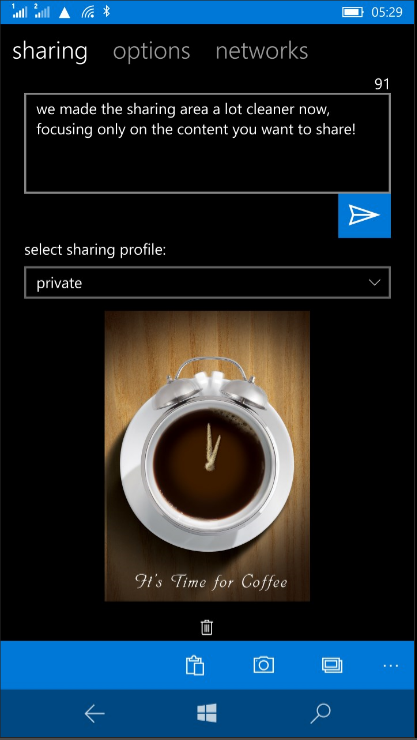
Share your content through social networks & more in one click with UniShare for Windows.


Windows Phone and Windows 10 Mobile like all operating systems let us share just about anything to social networks, to messaging apps etc. But the annoying thing is that these modern OSs don't bundle a simple thing like sharing to all these platform in a click, a kind of share-once-to-all. We all have a presence on more than one social network. Every time I update this blog, it used to be a pain to share my posts to my multiple social accounts. Thanks to UniShare, sharing in one click makes life a lot easier.


UniShare is a Universal Windows app that's available free on Windows PC and phone and is a simple and powerful app. In its basic free form, UniShare allows you to share content to Facebook, Twitter and LinkedIn in one click. All you have to do is safely add your accounts into the app. The app itself will appear in the sharing options throughout Windows and when selected, lets you share content through the three social platforms mentioned above in one click. That's for the free version.

UniShare also comes in Pro version with the following additional features and support for more networks:

  • Twitter - Up to 3 accounts
  • LinkedIn
  • Facebook - personal accounts plus pages you are admin/contributor
  • Tumblr
  • Pocket
  • Geeklist
  • Path
  • Slack
  • Choose from a broad range of picture upload packages - from 5 pics for free up to unlimited)

I strongly recommend you download UniShare in the Windows Store and enjoy the ability to share content to all your networks, email, messaging and other supported apps in a few clicks. And it is continuously being updated. See the full change log below:
- more languages (German, Italian, Dutch, Norwegian) 
- added link to translator registration page 
- mention suggestion search for Facebook no longer needs upper case letters 
- Import/Export of Sharing Profiles fixed, no longer throws errors 
- adding a picture from camera/library or pasting from clipboard is now also available in Sharing View 
- better handling of situations without internet connection 
- fixed sharing to external apps 
- added leet conversion extra 
- added Klingon translation extra (Pro) 
- added Giphy extra 
- lots of bug fixes  

Wednesday, March 16, 2016

Twitter for Windows 10 Mobile gets a new beautiful design, content discovery, Moments and more.

Well that is kind of unexpected. Twitter today released a major update for Windows 10 Mobile totally making it beautiful and also bringing some new features that makes the app identical to its PC sibling. It even got the little heart in replacement of the star to 'Like' a Tweet. Really, the design is beautiful and on par with Twitter apps on other platforms with the addition of the black theme, which is not available on Android and iOS. Unfortunately, switching to black theme is not app specific and cannot be done in the app settings, is related to the system theme. There's also no way to navigate horizontally to switch between the different pivot screen. Overall, it remains a nice update and I expect it will get better in a future update.

Check out the full change log and update the app in the Windows Store:
Find the best of Twitter in an instant with Moments. Follow top stories through immersive pics, clips and conversations. Get insights and perspectives you won't find anywhere else. 
- Find the best of Twitter in an instant. 
- Get exclusive pics, clips and conversations. 
- Express yourself with a Tweet. 
- Find people and accounts that interest you. 
- Hello from this part of the world! 
- See the moment.

Wednesday, August 19, 2015

Telescope for Periscope brings all live broadcasts in new global screen.

If you're a fan of live video broadcasting, then you probably already use Telescope for Periscope, a third party client of Twitter's Periscope service. Telescope was released on Windows Phone shortly after Twitter made the the first official app available on iOS. It was released on Android months later. The latter joined the club of users who enjoyed broadcasting live videos to the world. 

Telescope for Periscope (I'll just call it Telescope as from now) has picked up an update today that raises the version number to 1.1.05 with the following changes:

  • Loading indicator on sign-in.
  • Updates to home screen to show broadcasts from followers and most recent ended broadcasts.
  • New global screen to see all live broadcasts.
Download the update in the Windows Phone Store.


Saturday, April 18, 2015

Telescope for Twitter's Periscope update fixes crash on login.


Live video sharing is the new craze these days after Twitter acquired Periscope, a company or service that lets users broadcast live video to their followers for the world to see. Periscope was launched last month on Apple's iOS only. Fortunately, the vibrant Windows Phone developer community has stepped up and made an excellent third party Windows Phone app called Telescope to give access to Twitter's Periscope.


As of now, Telescope allow users to sign up follow users and view broadcast. The developer has announced that more features are on the way, including the ability to broadcast. In the mean time, an update has been published to the store that fixes a bug that caused the app to crash on login. Indeed, many reported not being able to get past the login screen

Telescope is available free in the Windows Phone store. Give it a try if you haven't done so yet and send your feedback to the developer.

Tuesday, July 08, 2014

Official Twitter app for Windows Phone gets big update.

The Official Twitter app for Windows Phone has been quite silent for some time. So it's with great pleasure that I acknowledge receipt of this big update from the popular micro-blogging platform. Those new features seems to bring the Windows Phone version on par with competing platforms and should silence those vociferous critic that Windows Phone is a platform that no developers care about as both Twitter and Facebook have beta version of their apps that are continuously getting new features before being ported to the official app. And numerous of these features are results of beta testers feedbacks. The "What's new" in this update is quite self explanatory, so I'll just publish the change log as is:
  • Tag your friends in a photo to start a conversation.
  • Capture the moment by uploading multiple photos to a single tweet.
  • Tweets with Twitter photos, Vine videos and other select content now show a preview in your home timeline.
  • You can reply, retweet, favorite or follow someone straight from a Tweet in your home timeline.
  • Share photos through Direct Messages.
Happy download and enjoy this new version of Twitter for Windows Phone.

Wednesday, April 30, 2014

"My Social Share Target" brings sharing to multiple social networks back to Windows Phone 8.1 preview.


No doubt Windows Phone 8.1 Preview has got the attention of many. Two weeks since its release, the preview has more than a million download and has garnered a lot of positive reviews. No need to say Windows Phone fan boys and fan girls are happy and excited about the preview. However, there are a few things that Microsoft chose to remove in Windows Phone 8.1 Preview. One among them is the ability to share to multiple social networks with just one tap. A feature unique to Windows Phone until the release of the preview. By removing this feature , some are claiming that Windows Phone 8.1 Preview sharing feature looks a lot like...Android. And it does. But the comparison stops there.


Enter MSiccDev.

Since last week, an app has been published to the Windows Phone Store by MSiccDev to fill in for the multiple sharing feature removed by Microsoft. The app is called "My Social Share Target SL" and is a test version everyone can download and submit feedback. My only issue with it is its name which I hope will change on final release.

My Social Share Target adds the multiple sharing feature back to Windows Phone, accessible either via the app list, a pinned tile and, better yet, via the Me tile. The latter feature will let you post a status update to multiple social networks again. Currently, Facebook and Twitter are supported with more to come.

My Social Share Target is a free download in the Windows Phone Store.

Thursday, June 06, 2013

Official Twitter app updated; Gets 8 photo filters and Vine support in timeline.

The official Twitter app for Windows Phone got a nice update today. The app now supports photo filters. The filters can be applied to a picture taken within the app or selected from the camera roll. Watching Vine video within tweets is also supported.

New features:

*  Apply filters and effects to your photos

*  Watch Vine videos from your timeline

*  Compose Tweets seamlessly with the new integrated composer
 
*  Various bug fixes

Get the update in the Windows Phone Store.


Tuesday, February 26, 2013

Twitter releases major app update for Windows Phones.

Finally the official Twitter app for Windows Phone gets a slew of updates. The app has four tabs at the top to navigate the Home, Connect, Discover and the Me tab. The update also supports the unique Windows Phone live tile experience with the tiles automatically updating to show your Twitter activity. The lockscreen feature is also supported for devices running Windows Phone 8.

Here's the list of new features in Twitter for Windows Phone 2.0. This update applies to Windows Phone 7, 7.5 and 8.


*  Integrated right into your Windows Phone with faster performance, lock screen, and custom Live Tile that show your notifications

*  Direct access to your favorite profiles and lists optimizing Windows Phone "pinning" functionality

*  Streamlined navigation brings you the new Home, Connect, Discover and Me tabs
 
*  Engage with the best Twitter content available in the Discover tab, as well as Trends, browse categories, find friends, and suggestions about Who To Follow 

*  Enjoy your Retweets, favorites, follows, mentions and replies in the Connect tab, or filter your mentions and replies only

Source: Windows Phone Store