Showing posts with label LinkedIn. Show all posts

Wednesday, November 15, 2017

UniShare for Windows updated with minor changes and bug fixes.


Like me, you probably have a presence on multiple social networks and sharing to multiple platforms can be cumbersome, but thanks to apps like UniShare, this task is made easy. UniShare for Windows lets you share anything in a few clicks. In its free form, UniShare supports sharing to Twitter, Facebook and LinkedIn. But if you consent to paying a few bucks, you can unlock other features, making it one of my favorite apps on Windows 10. UniShare is also available on Android. It is really cool and a time saver to be able to share my blog posts to the world I just a few clicks.

Today, the Windows version of the app has been updated with the following features:

·       Some minor changes needed because of the Creators Update for Windows 10.

·       Removed Geeklist.

·       Bug fixes.

UniShare is available on the PC, Mobile, Hololens and Hub. Check it out in Microsoft store.


Saturday, July 30, 2016

Share your content through social networks & more in one click with UniShare for Windows.


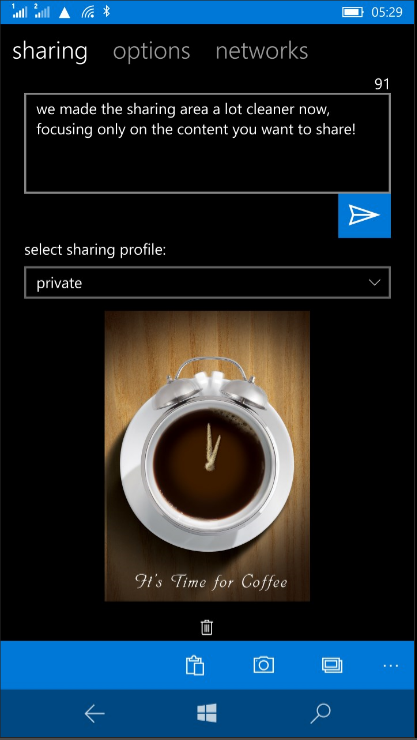
Windows Phone and Windows 10 Mobile like all operating systems let us share just about anything to social networks, to messaging apps etc. But the annoying thing is that these modern OSs don't bundle a simple thing like sharing to all these platform in a click, a kind of share-once-to-all. We all have a presence on more than one social network. Every time I update this blog, it used to be a pain to share my posts to my multiple social accounts. Thanks to UniShare, sharing in one click makes life a lot easier.


UniShare is a Universal Windows app that's available free on Windows PC and phone and is a simple and powerful app. In its basic free form, UniShare allows you to share content to Facebook, Twitter and LinkedIn in one click. All you have to do is safely add your accounts into the app. The app itself will appear in the sharing options throughout Windows and when selected, lets you share content through the three social platforms mentioned above in one click. That's for the free version.

UniShare also comes in Pro version with the following additional features and support for more networks:

  • Twitter - Up to 3 accounts
  • LinkedIn
  • Facebook - personal accounts plus pages you are admin/contributor
  • Tumblr
  • Pocket
  • Geeklist
  • Path
  • Slack
  • Choose from a broad range of picture upload packages - from 5 pics for free up to unlimited)

I strongly recommend you download UniShare in the Windows Store and enjoy the ability to share content to all your networks, email, messaging and other supported apps in a few clicks. And it is continuously being updated. See the full change log below:
- more languages (German, Italian, Dutch, Norwegian) 
- added link to translator registration page 
- mention suggestion search for Facebook no longer needs upper case letters 
- Import/Export of Sharing Profiles fixed, no longer throws errors 
- adding a picture from camera/library or pasting from clipboard is now also available in Sharing View 
- better handling of situations without internet connection 
- fixed sharing to external apps 
- added leet conversion extra 
- added Klingon translation extra (Pro) 
- added Giphy extra 
- lots of bug fixes  

Wednesday, December 11, 2013

Skype, Translator and LinkedIn updated.

Some of my favorite apps today got updated. Skype now loads faster; Translator supports more languages offline; and linkedIn lets you edit your profile on your device. Check out the full change log below:

Skype

- Faster start-up time.
- Copy and paste instant messages in chat.
- High contrast accessibility mode.
- General fixes and improvements.


Translator 


- Camera translation for Danish, Dutch, Finnish, Norwegian, Russian and Swedish
- Offline translation for Dutch, Norwegian, Russian and Swedish
- Lamp in camera mode
- Remove history items one by one

LinkedIn

Build your reputation: Add and edit your profile picture
•  Leverage your network: Easily grow your network from people in your address book
•  Increase your knowledge: More easily see who's viewed your profile and join groups

Wednesday, April 17, 2013

LinkedIn for Windows Phone 8 gets big tiles and speech recognition.

An interesting update for LinkedIn has been published to the Windows Phone Store that adds support for Windows Phone 8 big tiles and voice recognition. The latter lets you use voice command to access your Inbox and more. 

As a FYI, Linked is a social network for your professional life. While I do have an account, and like Google Plus, I hardly ever go there. Except when there are some activity that requires my attention, like someone sent me a message last week. That reminded me that I have LinkedIn installed on my devices. And then came this update. So I'm unlikely to forget soon.  

Back to the update. Besides speech recognition and Windows Phone 8 tiles support, the app also takes advantage of the lock screen to display images. More language support have been added.

Check out the update on Windows Phone Store.