Showing posts with label Windows 10 Mobile. Show all posts

Wednesday, November 15, 2017

Nextgen Reader, a powerful RSS news reader for Windows 10 fixes a Facebook login error in latest update.


When Google announced the closure of Google Reader back in 2013, Feedly was quick to step in as a replacement and it has been my favorite news aggregator on Android and my Apple devices.  Unfortunately, Feedly, up to this day, does not have an official app for Windows and Windows Mobile. But thanks to third party developers, Windows users have a news aggregator in Nextgen Reader, a free app with in-app purchase that requires a Feedly login, which basically is a Google login. 
Today Nextgen Reader is my favorite news aggregator on my Windows devices, both mobile and desktop. So, if you’re looking for a decent news reader for Windows, Nextgen Reader is one that I strongly recommend.

Nextgen Reader was updated today, bringing the version number to 7.0.23.0, which makes it a minor update. In fact, it is a fix. The change log says that it’s a fix for a Facebook login error. Since I do not use Facebook to login to Nextgen Reader, I cannot write in detail about the error. But if you do, you’ll be glad to know that whatever issue you’re having with Facebook login is now fixed.

Wait no more and go to the Microsoft Store to download the update.

Saturday, November 26, 2016

Playcast gets XBOX One support and more.

Playcast has been developed to allow users to cast movies, songs and pictures not only to Google Home, but also to Google Cast Audio, Apple TV (AirPlay), DLNA Smart TV, Miracast, Internet Box, Xbox One, Xbox 360 etc. Playcast cost $3.99 and offers a week trial before you make the decision to buy it and I can tell it is a well worth purchase. There are not many apps in the Windows Store that let you throw stuff to your TV. Plus the app is regularly updated with new features and fixes. 

Speaking of updates, Playcast has been updated this week. Check out the change log:

  • XBOX One ready.
  • Chromecast Audio Multi-room support.
  • German language.
Download Playcast in the Windows Store. Playcast is Windows Universal App. Buy it once and you'll be able to use it on your Windows phone and PC.


Saturday, October 15, 2016

Asphalt 8: Airborne update for Windows brings new competition, rewards and new cars.

If you're having a lonely and boring Saturday with your Windows Phone, download the latest update to Gameloft's Asphalt 8: Airborne game to enjoy great new features. Today's update introduces Multiplayer Seasons where players will race against other players to score points in time-limited races to unlock prizes. The multiplayer league lets players earn bigger rewards at the end of the season as you drive your way through the top of the league.

An update of Asphalt 8 without new cars is not an update per se. This one adds more virtual cars for your pleasure: Falcon7, Mercedes-Benz CLA 45 AMG series, GT by Ctroen, Icona Vulcano V12 Hybrid. The developer promises more cars you cannot afford in future updates.

Check out the full change log before heading to the Windows Store to download and update Asphalt 8: Airborne:

- MULTIPLAYER SEASONS: Multiplayer just got a nitro boost of competition and rewards! Race your best against other players to score points and unlock prizes in limited-time Racing Seasons. 

- MULTIPLAYER LEAGUES: Your skills behind the wheel will be fully recognized as you score high ratings and make your way into higher leagues. The better your league, the bigger your rewards at the end of the Season! 

- NEW CARS: Hungry for more speed machines? The Falcon F7, Mercedes-Benz CLA 45 AMG Racing Series, GT by CITROEN, Icona Vulcano V12 Hybrid, and more will be added regularly, so check back often! 

- NEW EVENTS: Are your skills sharpened and your engine revved for the new R&D event and 2 new Enduro Challenges? Be among the first to claim some of the most powerful cars ever added to the game! 

 - RIO & AREA 51 UPGRADES: We’ve improved our newest tracks with greater visibility, better lighting and lots of tweaks to make every race more vivid than ever.

Saturday, October 01, 2016

Game Troopers launches Pebble game for Windows Phone.

I like those games that do not take a toll on your sanity and helps you enjoy, have fun and relax. Pebble from game powerhouse Game Troopers seems to fall into that category with a game that is simple, "easy to play but really hard to dominate, the perfect mixture between minimalism and velocity, all inside a peaceful environment with relaxing music". I have not played it yet, but this description definitely makes it tempting.

The game play is simple. Drag the pebbles inside a circle as long as their colors match. Should you miss, it's game over.

The game features:

  • Drag the pebbles of the right color inside the central circle.
  • Challenge your friends and play together on the same device.
  • Infinite game play, how many points can you score?
  • Boost your game play with amazing power-us.
  • Log in every day to get big rewards.
Before proceeding to the Windows Store to download Pebble on your Windows Phone 8.1 and Windows 10 Mobile, check out this short video: 

Saturday, September 03, 2016

Candy Crush Jelly Saga for Windows gets 420 new tasty levels.

I don't know about you, but my Candy Crush intake has dropped to the zero level now, even if the game comes pre-install in Windows 10. Candy Crush, like the Angry Birds franchise, are those games that just plain refuse to disappear. Candy Crush for its part keep adding more "chewy episodes" for the fans out there and I can tell there are a lot and I'm making this statement based on the number of phones and tablets that popup during commute with the different versions of the game running.

In order to keep the fan base happy, 420 levels were added to the game today. Yep, you have to be a fan to enjoy going through all of this. I never got to get above level 10 because I get bored very quickly. For the fans out there, head to the Windows Store to grab the update.

Sunday, July 31, 2016

Playcast for Windows restores Sort buttons in new update.


Playcast is a must-have multimedia player to cast your movies and songs to devices like Google Chromecast, Chromecast Audio, Apple TV, DNLA Smart TV, Miracast or the Xbox One. A Windows Universal app, Playcast is available for $3.99 in the Windows Store with a 7 days full-featured trial. Being a universal app, you buy it once and use it across your Windows devices.

Playcast was updated today with a minor fix which restores the Sort buttons which was accidentally removed in a previous update. Playcast is one of my favorite apps on Windows and one that I strongly recommend. My only issue with it is that it does not support playing movies purchased from the Windows store for obvious rights reason and I cannot blame the developer for this.

Saturday, July 30, 2016

Surfy browser for Windows Phone gets a new logo.

New logo
Old logo


Surfy is a popular browser on Windows Phone. Unfortunately, its use is held back by the fact that Microsoft does not allow the switch to a browser of our choosing, the default being Internet Explorer on windows Phone and Edge on Windows 10 Mobile. And Surfy offers some nice features that Edge doesn't. It supports tab browsing similar to browsers on tablets or PCs. Surfy also lets you use swipe gestures to navigate between open tabs. All in all, Surfy is a great browser that just works. I just wish I could use it as my default browser.

Surfy has been updated today. However there are no new features, bug fixes or performance improvement, just a simple change of logo. Get Surfy free in the Windows Store.


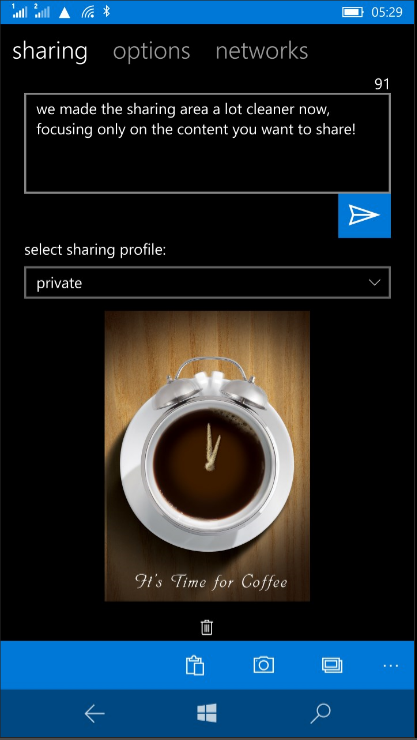
Share your content through social networks & more in one click with UniShare for Windows.


Windows Phone and Windows 10 Mobile like all operating systems let us share just about anything to social networks, to messaging apps etc. But the annoying thing is that these modern OSs don't bundle a simple thing like sharing to all these platform in a click, a kind of share-once-to-all. We all have a presence on more than one social network. Every time I update this blog, it used to be a pain to share my posts to my multiple social accounts. Thanks to UniShare, sharing in one click makes life a lot easier.


UniShare is a Universal Windows app that's available free on Windows PC and phone and is a simple and powerful app. In its basic free form, UniShare allows you to share content to Facebook, Twitter and LinkedIn in one click. All you have to do is safely add your accounts into the app. The app itself will appear in the sharing options throughout Windows and when selected, lets you share content through the three social platforms mentioned above in one click. That's for the free version.

UniShare also comes in Pro version with the following additional features and support for more networks:

  • Twitter - Up to 3 accounts
  • LinkedIn
  • Facebook - personal accounts plus pages you are admin/contributor
  • Tumblr
  • Pocket
  • Geeklist
  • Path
  • Slack
  • Choose from a broad range of picture upload packages - from 5 pics for free up to unlimited)

I strongly recommend you download UniShare in the Windows Store and enjoy the ability to share content to all your networks, email, messaging and other supported apps in a few clicks. And it is continuously being updated. See the full change log below:
- more languages (German, Italian, Dutch, Norwegian) 
- added link to translator registration page 
- mention suggestion search for Facebook no longer needs upper case letters 
- Import/Export of Sharing Profiles fixed, no longer throws errors 
- adding a picture from camera/library or pasting from clipboard is now also available in Sharing View 
- better handling of situations without internet connection 
- fixed sharing to external apps 
- added leet conversion extra 
- added Klingon translation extra (Pro) 
- added Giphy extra 
- lots of bug fixes  

Friday, July 22, 2016

F1 official app for Windows updated.


The F1 official app for Windows has been available for a short while and it's one that F1 fans must have to follow everything about the Grand Prix anywhere. The app is a Universal Windows App one, meaning it is downloadable on a Windows PC and phone or tablet.

The F1 app is a free app with the following features:
* Live Race Leaderboards (limited) 
* Latest news and videos 
* Post-race highlights 
* 2016 Schedule, Team and Driver Standings


Now if you're a fan and is willing to spend some money for additional features, here is what you will get with in-app purchase:

* Official Live Timing of all F1® sessions 
* Sector times with intervals and gaps, live tyre and pit stop information 
* Interactive 3D maps with driver gears and speeds, plus Drag Reduction System (DRS) usage indicator 
* In-Corner Analysis comparing drivers’ entry, apex and exit speeds 
* Immersive dashboard with text commentary (English, French and German), and English audio commentary during all F1® sessions 
* Team Radio Transmissions and Race Control Messages 
* Personalisation Options and more!

The app was updated today. Unfortunately, there is no change log. With the Hungary Grand Prix in full swing, grab the update in the Windows Store and enjoy.

Wednesday, June 15, 2016

Playcast for Windows 10 Mobile updated with a few fixes.


Playcast is a media player developed to allow Windows Phone users to cast movies, songs and pictures not only to Google Cast, but also to Google Cast Audio, Apple TV (AirPlay), DLNA Smart TV, Miracast, Internet Box, Xbox One, Xbox 360 etc. Playcast cost $3.99 and offers a week trial before you make the decision to buy it and I can tell it is a well worth purchase. Plus the app is regularly updated with new features and fixes. Speaking of updates, the developer, Webrox, published one a few days ago with some fixes:

  • Background audio volume bug fixed.
  • Workaround for Yamaha DLNA devices which won't show duration.

Again, Playcast is an app that I strongly recommend. Get it here in the store. 

Wednesday, May 25, 2016

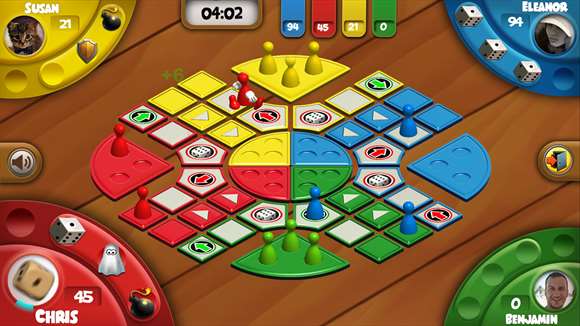
Simple, elegant and dynamic Ludo game ported to Windows by Game Trooper.

I used to play Ludo when I was a kid with my brothers and there was rarely, if never, a winner as the games always ended in a fight because one of us had cheated. In case you're wondering, it is not the author of these lines. That was a long time ago and I don't play Ludo anymore, but I'm glad to see the game ported to Windows as a Universal Windows Game under the name Ludo Blitz. We owe this to the good folks at Game Troopers who kept the game "simple and elegant, but also incredible more dynamic and unpredictable."


Key features
Shorter and casual games – ideal for your coffee breaks, or subway travels
Get ready for a completely new and challenging game every time you start playing. 
Watch your Pawns come to life – Enjoy the hi-res 3D movements and actions
6 boosters to take the fun in LUDO to a new level
2 special fields to enhance the wonderful chaos of LUDO

Ludo Blitz is free in Windows Store. However, it is possible to buy some items within the game. Check out the video about the game before heading over to the Windows Store to download Ludo Blitz.


Wednesday, March 16, 2016

Twitter for Windows 10 Mobile gets a new beautiful design, content discovery, Moments and more.

Well that is kind of unexpected. Twitter today released a major update for Windows 10 Mobile totally making it beautiful and also bringing some new features that makes the app identical to its PC sibling. It even got the little heart in replacement of the star to 'Like' a Tweet. Really, the design is beautiful and on par with Twitter apps on other platforms with the addition of the black theme, which is not available on Android and iOS. Unfortunately, switching to black theme is not app specific and cannot be done in the app settings, is related to the system theme. There's also no way to navigate horizontally to switch between the different pivot screen. Overall, it remains a nice update and I expect it will get better in a future update.

Check out the full change log and update the app in the Windows Store:
Find the best of Twitter in an instant with Moments. Follow top stories through immersive pics, clips and conversations. Get insights and perspectives you won't find anywhere else. 
- Find the best of Twitter in an instant. 
- Get exclusive pics, clips and conversations. 
- Express yourself with a Tweet. 
- Find people and accounts that interest you. 
- Hello from this part of the world! 
- See the moment.

Saturday, February 06, 2016

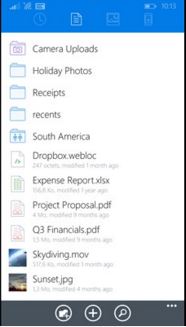
Dropbox for Windows Phone 8.1 updated with quick search, commenting and Jump list.

Dropbox

Dropbox for Windows Phone is a Windows Universal app, meaning that it works on Windows for desktop and Windows 10 Mobile. The popular cloud storage app also works with Windows Phone 8.1. Today, Dropbox was updated to bring some of the Windows 10 features to Windows Phone 8.1.

With this update Windows Phone 8.1 and Windows users will be able to initiate a search by simply typing anywhere. They won't necessarily need to tap the search icon first. The app also allow users to comment on files, bringing collaboration with others by inviting them to a discussion with the use of @mentions. Finally, there's Jump list for access to recent files through a right click on the application icon and tile.

Grab the update in the Windows Store.

Monday, February 01, 2016

WeChat for Windows Phone updated with content sharing from Cortana.


The Windows Store on my Lumia 1520 is showing an update is available for the popular messaging app WeChat. Like other apps of its kind, WeChat is a cross-platform app for texting, making video calls, voice messages. Tencent, the China-based company and owner of WeChat, claims the app currently has 400 million users, many of which are in China where WeChat is extremely popular.

According to the change log, the updated app improved on the user experience on Windows 10, but does not give details about those improvements. The second item in the change log is the ability for sharing content from Cortana. I have yet to figure out how that works though.

WeChat is a nice messaging platform with a great walkie talkie which supports real time conversation with up to 40 friends. If you haven't tried it yet, download WeChat for Windows 10 Mobile in the store for free.

Saturday, January 23, 2016

Dropbox is now a Universal Windows Platform app with a bunch of new features.

Dropbox
The more storage we have the better, no matter if we have to use different and several storage providers, especially that there are apps like CloudMesh that brings them all together for easier management. However, if Dropbox is one of your cloud storage, an update has been published to the store today for Windows 10 that makes it a Universal Windows Platform app. But the Windows 10 Mobile version of the app is not available yet. But I assume it shouldn't be long before it lands in the Windows store.

This update makes the app a lot faster, brings quick search, interactive device notifications, drag and drop functionality, Windows Hello integration, commenting and Jump List. See the change log below for details and head into the Windows store to download the update.

Microsoft updates Sway for Windows 10 with recycle bin, full screen mode, more textures and groups nesting.

Microsoft Sway
If you suffer from severe lack of arts talent like me, you will probably like Sway, a digital storytelling app made by Microsoft to give life to your photos. Put them all together with some text, videos and some other stuffs and you get a beautiful and professional presentation to show to your friends, family and colleagues. And again, you don't have to be a professional artist or be a PowerPoint specialist to use Sway. With that said, Microsoft has updated Sway for Windows 10 today that adds more styles and background textures, groups nesting and the usual performance improvements and bug fixes. Check the full change log below. Note that Sway is not a universal app yet, so, sadly, you won't find it in the Windows Phone store. 

We're all familiar with the Recycle Bin in Windows where all our deleted items are stored and I'm sure we all have stories of items deleted accidentally. Thanks to the Recycle Bin we're able to recover those items. Microsoft has ported the Recycle Bin feature to Sway. It work the same as on the PC in that sways that are deleted end up in the Recycle Bin for 30 days. Where it gets really interesting is that way that you delete on the web, Windows 10, iPhone and iPad will all go to the Recycle Bin. You can also choose to permanently delete them to empty the Recycle Bin, just make sure you really want to do that by checking what's in there before clicking that OK button.

Here's what's new:

  • More Styles and Background Textures — Customize your Sways with additional styles featuring a variety of new background textures. 
  • Groups in Groups – Nesting groups of content in other groups allows new format combinations, particularly in Sway’s presentation-oriented layout. 
  •  Miscellaneous — We've made additional performance improvements and bug fixes.
Download Sway in the Windows Store.

Thursday, January 21, 2016

Playcast for Windows 10 gets major update, 1 more free day trial and some fixes.

When Playcast was released, I purchased it without hesitation despite the fact that a few days trial was available. And that's because the developer behind this excellent app is also the one who made the best YouTube app for windows 10, Tubecast (Paid, free). The latter and Playcast have that thing in common in that you can cast media to Chromecast, or DLNA devices. 

However, after buying the app, I ran into issues as it failed to cast movies to my Chromecast while it handled songs well. I reached out to the developer and he very quickly contacted me to help solve the problem. After sending one of my movies, he found out that a particular format was not being handled properly and a fix was quickly released.

Today, I am enjoying my movies from my Lumia 1520 via Chromecast. The fix is part of the update that the developer released today, among other fixes and new features as shown in the change log below:

What's new in version 0.8.0.0:
Monetization:

  • 1 more FREE day in trial per app update.
New drive sources:
  • DLNA Media Server
  • Google Drive
  • Dropbox
  • Freebox
Technical:
  • MP4 'FastStart' transcoding on the fly for Chromecast unreadable MP4.
  • Miracast support.
There's also some UI improvements:
  • Remove items in Recent/Queue
  • Shortcut (desktop): F5 refresh - F11 fullscreen
  • Progress bar preview in PIP
  • Changelog popup at startup if it's a new version
  • "My libraries" only shows right content type files
  • List performance
  • UI contrast improvements
Get the app in the Windows Store.

Saturday, December 19, 2015

Adobe Photoshop Express makes Noise Reduction and Looks premium packs free for a limited time.

Adobe Photoshop Express is an excellent photo editor app for Windows desktop and Windows 10 Mobile and one of my favorites because it's super simple to use and full of those automated tasks that makes my photos look good without much effort. I'm very lazy when it comes to photo editing plus my lack of artistic taste is evident. I always scored ZERO in arts class, no kidding. 

That's why I like apps like Adobe Photoshop Express, to handle those tedious manipulations for me. The app has been updated today with one feature removed, Adobe Revel. The latter was Adobe's cloud storage solution to store your photos and sync them to your Windows computer/tablet and iPad. Adobe did not say the reason for removing Adobe Revel.

With the holidays almost upon us, Adobe is making its premium features free, meaning the Adobe Noise Reduction Pack which was sold at $4.99 and the Adobe Looks Pack which was at $2.99 are now free when you sign in with an Adobe ID. Adobe does say within the app that this offer is "for a limited time", so hurry to take advantage of it in the Windows store.

Tuesday, December 15, 2015

Windows Maps for Windows desktop and Mobile gets lane guidance, Santa tracking and Home pinning.

Windows Maps for desktop and Windows 10 Mobile was updated today with features that I find very helpful. Not that I really need them in Mauritius, but they will come in very handy during my travels. Before we look into the update, I want to draw your attention on the availability of the update on Windows Desktop and Mobile at the same time. This is the power of Universal apps.

In this update, Microsoft introduces a feature I think they borrowed from Here Maps, recently owned by Nokia and sold to a German consortium, which lets users pin their Home and later tap on it to get directions back. In this update, Microsoft lets you do that by pinning your Home or Work to get guided directions from anywhere.

With Christmas right around the corner, every maps app has to have their own Santa tracking feature and Windows Maps will let you find Santa and "follow him as he travels around the world on December 24th". Microsoft says in the change log that this feature is not available in all countries or regions. In the case this feature doesn't work at your location, just sit back with your favorite drink with your family and do it the old way, by scrutinizing the sky, which is way better than looking at a screen.

The last item in the log, is lane guidance in turn-by-turn navigation. Every driver, no matter how good, has had to face this moment of not knowing which lane to use. This feature should help avoid these confusing moments for a safe ride. 

This is pretty big update for Windows Maps. This app gives you voice navigation, turn-by-turn driving, transit, and walking directions for free and without the need of a live internet connection. Simply download the maps within the app, but before you can do that, make sure you download/upgrade Windows Maps app in the store.

Wednesday, August 12, 2015

Microsoft announces Windows 10 Mobile Build 10512.


Microsoft has unexpectedly made Build 10512 of the Windows 10 Mobile available to the Fast ring of the Windows Insider program. Gabe Aul, also known as the ring master, posted a list of improvements and fixes on the Windows blog:
  • General improvement in overall stability and performance.
  • You can now set the Lock screen and background image from within the Photos app.
  • We fixed an issue where apps installed on SD cards weren’t working after a reboot.
  • We have improved Latvian and Chinese inputs.
  • We have made improvements to the Kid’s Corner tile layout.
  • We have improved reliability of Data Sense notifications.
  • Modified Shape Writing algorithm to be less aggressive in suggesting contact names over common words.
  • Resolved an issue where Camera would not launch when the phone was locked.
  • We fixed an issue where notifications for incoming text messages weren’t appearing.
  • We fixed an issue where the touch screen wouldn’t be responsive after ending a phone call on some devices.
  • And we fixed an issue where folder tiles have obviously overlapping text.
According to Gabe Aul, Windows 10 Mobile builds should be released more frequently now. He also posted a list of known issues that needs to be addressed:

  • Mobile hotspot doesn’t work in this build. When sharing the Internet from your phone using Mobile Hotspot, devices will fail to get a valid IP address from your phone and will show no internet access.
  • Two-factor authentication for your MSA with a phone number doesn’t work in this build. If you reset your phone and go through the first run experience, you won’t be able to input more than 2 characters for validating phone or text authentication. If you have a secondary email for two-factor authentication – you can choose that. As a workaround, add secondary email for two-factor authentication.
  • Some phones might spend a long time in the post update migration experience – just let the phone sit and it should complete this migration.
  • Apps that use background audio such as Groove, Podcast, Pandora, etc. will crash when launching after receiving an app update from the Store. Rebooting the device will resolve this issue.
  • Some phones with a large number of tiles pinned to the Start screen may get stuck in a state where the device shows “Loading…”; the device will need to be reset or rolled back to Windows Phone 8.1 using Windows Phone Recovery Tool.
  • Some apps may fail to update through the Store with the error code 0x80073cf9; uninstalling the application and reinstalling it will resolve this issue.
  • The Movies & TV app will not work in this build (video playback is currently broken).
The most annoying issue for me is the 5th item in the list where the phone will remain stuck while loading the Start screen. There are two workarounds which are to hard reset or go back to Windows Phone 8.1 and I'm not willing to go through this again on my Lumia 1520. I had to roll my 920 back to 8.1 today, so I'll wait for the next build with hope that Microsoft will definitely fix the "loading" problem.