
Monday, December 24, 2012
Merry Christmas & happy New Year to you all.


Thursday, December 20, 2012
6 cool Xbox Live games prices drop to $0.99.

Wednesday, December 19, 2012
This month's Windows Phone photo challenge: Happy Holidays!

Use your Windows Phone to snap pictures of what you think best despicts the Holiday seasons. Then email the picture to the Windows Phone team with "Challenge: Happy holidays" in the Subject line. Make sure you name the picture with your first and last name followed by the theme of the contest, that Happy Holidays.
All winning photos will be featured on the Windows Phone blog, Twitter and Facebook.
Check out the Windows Phone Team blog for more details about the contest.
Wednesday, December 12, 2012
Use your Windows Phone 7.5/8 to track Santa with NORAD's app.

Get the NORAD Tracks Santa app free on the Windows Phone Store.
Sunday, December 09, 2012
On Windows Phone 7.5, Angry Birds Space has landed.

"Rebel birds, striking from a hidden base, have won their first victory against the evil Imperial Pigs. During the battle, rebel spies managed to steal secret plans to the Empire's ultimate weapon the PIG STAR, and are racing to deliver the plans to the Rebel Birds. Now the need your help."
Ready to join the epic adventure? Angry Birds is priced at $0.99 and a trial is also available. May the Birds be with you.
Friday, December 07, 2012
Weather Smiles update adds Windows Phone 8 support.

New in V1.6.0:
- Added new setting to select between 1, 3 and 6 hour interval to update in background task. trial users interval is 6 hours only.
- New for Windows Phone 8 the medium tile size is taken advantage of for bigger font and non-scaled up tiled. Bigger, bolder an beautiful.
- New for Windows Phone 8, back tile now displays 5 day forecast for both locations thanks to larger medium tile.
- Small bug fixes, minor app interface aesthetic updates.
Download here. A trial is also available.
Tunein for Windows Phone updated; It now works.

To listen to online radios for free on your Windows Phone, download a free copy of Tunein here.
Wednesday, December 05, 2012
Nokia announces affordable Lumia 620.
Nokia has announced a new Windows Phone 8 phone today, the Nokia Lumia 620. The affordable phone is compact and sports a 3.8" screen WVGA with a resolution of 800x480, 512MB of RAM, 5MP camera as well as a VGA front facing camera. In terms of storage, the Lumia 620 offers 8GB of internal storage which can be extended with a Micro SD card up to 64GB. Add to that free 7GB of SkyDrive storage.. The Lumia 620 is powered by a 1GHz Dual core Snapdragon processor and 1300 mAh battery.
Depending of countries, the Nokia Lumia 620 will be available in several colors including, lime green, orange, magenta, yellow, cyan, white and black. The device will first be made available in Asia at an estimated price of USD249 excluding tax. It will start selling in early January 2013 and will also be available in Europe and the Middle East.
Read Nokia's press release after the break.
Depending of countries, the Nokia Lumia 620 will be available in several colors including, lime green, orange, magenta, yellow, cyan, white and black. The device will first be made available in Asia at an estimated price of USD249 excluding tax. It will start selling in early January 2013 and will also be available in Europe and the Middle East.
Read Nokia's press release after the break.
Thursday, November 29, 2012
Confirmed: Windows Phone 7.8 coming in early 2013.
In a blog post to the Windows Phone blog, Terry Myerson reveals that Windows Phone 7.8 rollout will begin in early 2013 as soon as test with hardware partners and carriers are completed. No mention is made about the devices to be updated besides the Lumia but the post does say that the maximum devices will get the update.

Terry Myerson also announces the release of new devices running Windows Phone 7.8 which will cost less than WP8. "New models running Windows Phone 7.8 are beginning to launch in many countries around the world, strengthening the ecosystem by bringing more Windows Phones to more people. These devices will typically be sold at a range of lower price points, meaning there will now be Windows Phones for everyone's budget and need. This is incredibly important for broadening the reach of Windows Phone across the globe and ensuring we have the right product for every market."
What's new in Windows Phone 7.8?
Besides the resizable tiles, the upgrade will include additional themes and accent colors, up to twenty. A new lock screen with the option to display the Bing picture of the day plus the PIN/Password challenge to avoid accidental device wipes on devices connected to Exchange servers. Unfortunately, there's still no support for Bluetooth file transfer and Internet Explorer 10. The latter needs multiple cores processor to run.
Now that we know more about Windows Phone 7.8, are you excited?
Read the full blog post
Posted while commuting to work.
Terry Myerson also announces the release of new devices running Windows Phone 7.8 which will cost less than WP8. "New models running Windows Phone 7.8 are beginning to launch in many countries around the world, strengthening the ecosystem by bringing more Windows Phones to more people. These devices will typically be sold at a range of lower price points, meaning there will now be Windows Phones for everyone's budget and need. This is incredibly important for broadening the reach of Windows Phone across the globe and ensuring we have the right product for every market."
What's new in Windows Phone 7.8?
Besides the resizable tiles, the upgrade will include additional themes and accent colors, up to twenty. A new lock screen with the option to display the Bing picture of the day plus the PIN/Password challenge to avoid accidental device wipes on devices connected to Exchange servers. Unfortunately, there's still no support for Bluetooth file transfer and Internet Explorer 10. The latter needs multiple cores processor to run.
Now that we know more about Windows Phone 7.8, are you excited?
Read the full blog post
Posted while commuting to work.
Wednesday, November 28, 2012
Don’t Get Scroogled: Bing Launches Campaign for Honest Search to Help Shoppers this Holiday Season
"we want to alert you to what Google has done with their shopping site right in time for Christmas. Instead
of showing you the most relevant shopping search results for the latest coffee maker you're looking to buy mom, Google Shopping now decides what to show you –and how prominently to display what product offers they show -- based partially on how much the merchant selling the product has paid them. Merchants can literally pay to improve their chances to display their product offers higher than others inside of Google's shopping "search," even if it's not better or cheaper for the consumer. The result of this new "pay-to-rank" system is that it's easy for consumers to mistake an ad for an honest search. That's not right, it's misleading."
Bing is really getting serious about the search business.
Source: http://blogs.technet.com/b/microsoft_blog/archive/2012/11/28/don-t-get-scroogled-bing-launches-campaign-for-honest-search-to-help-shoppers-this-holiday-season.aspx
of showing you the most relevant shopping search results for the latest coffee maker you're looking to buy mom, Google Shopping now decides what to show you –and how prominently to display what product offers they show -- based partially on how much the merchant selling the product has paid them. Merchants can literally pay to improve their chances to display their product offers higher than others inside of Google's shopping "search," even if it's not better or cheaper for the consumer. The result of this new "pay-to-rank" system is that it's easy for consumers to mistake an ad for an honest search. That's not right, it's misleading."
Bing is really getting serious about the search business.
Source: http://blogs.technet.com/b/microsoft_blog/archive/2012/11/28/don-t-get-scroogled-bing-launches-campaign-for-honest-search-to-help-shoppers-this-holiday-season.aspx
Outlook.com has over 25 million users, makes it easier for Gmail users to switch over.

- They prefer Outlook.com's clean user design
- Outlook.com does a better job of blocking spam and it outperforms Gmail when it comes to helping manage unwanted messages like newsletters and daily deals
- Outlook.com makes it easier to share photos and Office documents
The Outlook.com team is also announcing some new features that will be released in a few weeks:
One-click Archive: from the inbox, select messages and click the Archive button to move the selected messages to the Archive folder (or any other folder of your choice). It's a fast and simple way to move messages out of your inbox to find later.

More and more keyboard shortcuts: Outlook.com has dozens of keyboard shortcuts and we're adding even more. And better yet, we don't need to list them all in this post because you can now find all available keyboard shortcuts by simply typing a question mark when you're in your inbox.
More customization of your inbox: we added several new ways to make your inbox look and work the way you want.
Read more on Outlook Blog
Tuesday, November 27, 2012
Apollo Plus will bring VPN, WiFi fix to Windows Phone 8.

Source: The Verge
Monday, November 19, 2012
After "Smoked by Windows Phone", Ben Rudolph is back with "Meet Your Match".

A new series of videos has already been posted on the Windows phone blog featuring Ben Rudolph of course and the HTC Windows Phone 8x and the Nokia Lumia devices. "Meet Your Match" events will be held in Microsoft Store across the US as well as in the UK, France and Germany. If you're lucky to have one of these events, go ahead, you may well win something.
Check out the first series of "Meet Your Match" videos below.
Source: Windows Phone Blog.
Evernote and Twabbit for Windows Phone updated.
Evernote
 Among all note-taking apps, Evernote remains my favorite. I use it on all my devices because, one, it is free and, second and most importantly, my notes sync to the cloud and are therefore available on all my devices with little to no effort. Even if cloud synching is a feature that is now native into about any apps these days, Evernote is probably a precursor. Sure Windows Phone has OneNote, which I like. I can get it for free on Google Play for my Android. Unfortunately, while there is a version for iOS, it is not available for my region. But I like Evernote for its simplicity no matter which platform you're using it on.
What's new in this release of Evernote:


What's new in this release of Evernote:
- New tile layout design for note list
- Redesigned login and registration screens
- New popup tips help users discover the app
- More spacious note editing mode
- Numerous performance improvements including faster startup
- Evernote turns your phone into an extension of your brain.
Check the MarketPlace tile for the notification update. If you are not using Evernote yet and need a nice note-tasking free app, download Evernote for your Windows Phone.
Twabbit

Twabbit is one of the several Twitter clients that I use on my Windows Phone. Is it my preferred one? No, but it's second after glƏƏk!. Nothing much to write about here. The app is not free and costs $1.49. A trial is available. I managed to get it free when the developer decided to make it so for a limited time. Readers of this blog must have got it too at no cost.
What's new in version 1.2.9.92:
1. Bug fixes 2. Changes for twitter API 1.1 3. Retweets info not automatically loaded in tweet detailsTwabbit should already be showing up as an update on your Windows Phone. Otherwise, it can be downloaded on the Windows Phone Store
Thursday, November 15, 2012
Windows Phone 8 ads featuring Jessica Alba and Gwen Stefani.
After the launch of Windows Phone 8 last month, Jessica Alba, the mum of two, is back in a 30 seconds ad showing how she uses the Kid's Corner on her phone. Gwen Stefani is the other celebrity who has been tapped by Microsoft to promote Windows Phone 8. She is a fan of Skype and Office. Watch the two ads below:
Source: Windows Phone Blog
Source: Windows Phone Blog
Review: Manzer Lakaz (Home Food), first Mauritian app for Windows Phone.


Today I’m writing about a special and unique recipe app called Manzer Lakaz – Home food in English. Manzer Lakaz was developed by a Mauritian thus making it the first app made locally that is posted to the Windows Phone Store for free. So let’s take a look at Manzer Lakaz.
The app opens up on the featured recipe of the day screen. You see the picture of the featured recipe and its name. Tap and you’re taken to the full recipe with the cooking time next to the picture. Below is the list of ingredients you will need for the dish and easy-to-understand directions that will make sure that the dish will impress. The picture of the featured recipe will also show up on the live tile if you choose to pin it to the Start screen.
From the Featured recipe screen, swipe to the left to access the Explore screen where you will easily see the entirely list of recipes that the app has to offer or you can use the built-in filters to get the list of Dish Type, by Main Ingredients, By Cooking Method and By Cooking Time. The latter lets you filter furthermore with a choice of cooking time: 15mins, 30mins, 45mins, 1 hour and 1 hour 15mins. For example, the dishes that take longer to cook are Baked Aubergine and Beef Rougaille. This is good to know when planning.
The “By Dish Type” screen is quite interesting. The developer did a good job at making the navigation easy and intuitive. The dish Type screen is devised in such a way that it doesn’t necessitate a manual filter. It’s all there for you to peruse the 5 types of dishes at your leisure: By Appetizer, By Main Dish; By Side Dish; By Salad and by Desserts.
Again, the same experience applies throughout Manzer Lakaz. The “By main Ingredients” screen sorts dishes by Chicken, Fish, Beef, Pasta and vegetables. Same goes for the cooking method filter where you can choose between Boiling, by Simmering, by Pressure, by Grilling, by Baking and by Frying. No matter how and what you cook, it can be added to a favorite list for future reference. To do that, open a recipe and tap “Add favourite” on the menu bar at the bottom of the screen. Repeat the same steps from the Favorite window to remove the recipe from the list. Manzer Lakaz does fit well with the Windows Phone UI.
However, there are some features missing. It would be nice to have a Comment area for each recipe so users can also share their own tips or submit their own recipes. There are a lot of local dish that are missing in the app. But I’m sure more recipes will be added through future updates to showcase the rich culinary diversity of Mauritius.
All-in-all Manzer Lakaz is a nice and helpful app for people around the globe to use and discover Mauritian gastronomy.
Manzer Lakaz was developed by Wasiim Hosenbocus.
Download link: Windows Phone Store
Developer kills Reinstaller app for Windows Phone.
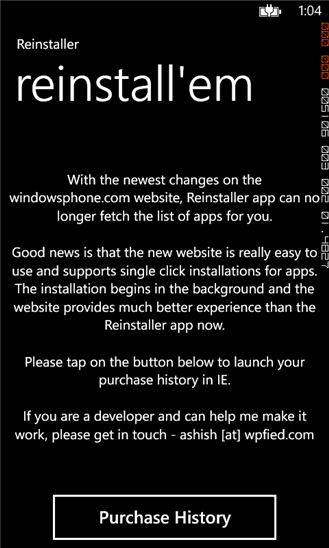
Let's see what the change log says:
- Completely broken with no immediate chance of working again.
- App will be removed soon after a few more tries.
This is the funniest change log I've ever read.
What force the developer to kill Reinstaller is simply the fact that Microsoft recently made some changes to the Windows Phone site. Because of these changes, Reinstaller is unable to get the list of your installed app anymore. Simple as that. The good news is that the developer is not entirely giving up on Reinstaller and is seeking help from fellow developers out there to make it work again. His email is ashish [at] wpfied dot com. As of now the app is still available in Windows Phone Store.
Wednesday, November 14, 2012
Amazon Kindle update fixes startup crash bug.
Do you read books on your smartphone? For some the screen is to small while for others, it's one of the very purpose of a smartphone. I do read books on my devices wherever possible. So yes, Amazon Kindle is a must have app for me. Today Amazon has published an update for the Kindle app that fixes crash at startup and fixes crashing bugs when opening books. Personally I haven't experienced any of these issues but the update is available for download in Windows Phone Store, so I'll just go for it and I encourage you to do the same.
http://windowsphone.com/s?appid=48195fb4-ee0e-e011-9264-00237de2db9e
"Amazon Kindle" is one of thousands of great apps for Windows Phone. See more at WindowsPhone.com!
Sent from my Windows Phone
http://windowsphone.com/s?appid=48195fb4-ee0e-e011-9264-00237de2db9e
"Amazon Kindle" is one of thousands of great apps for Windows Phone. See more at WindowsPhone.com!
Sent from my Windows Phone
Sunday, November 11, 2012
TextContact Light is one very useful app to share contacts via SMS on Windows Phone.


The answer to that is TextContact Light/Pro. A nice little free app that actually sends the full contact card with phone numbers, emails etc. Of course, you can remove whatever data you do not want to send. Before the how-to, you need to know that TextContact is available free with adds and limited features and a paid one, the Pro version.
The free version will let you send a contact card of course but you will not be able to save the SMS, access the History and pin to start. All these features are available only in the Pro version which cost $0.99.
Now for the how-to. After you start the app, you are presented with a To box at the top. Start typing the recipients name and a pickup list will appear, filtering your contact list as you type. The app itself does not support sending to multiple contacts. But there is a workaround. More about that later.
The second box is where the contact details you want to share will appear. To add the details to that box, tap the Add Contact icon on the Menu bar at the Bottom and select a contact. The selected contact is added to the second text box. You may modify its content as needed as the app will pull all the contact details except links to website or Facebook and Twitter.
That's it, now you're ready to send the SMS. Tap the Create SMS button and the built in Messaging app opens. If you need to share the contact with multiple recipients, tap the + sign at the top right corner of the screen to select another contact's phone number. Click Send. That's it.
TextContact Light is a useful app since Windows Phone does not have this feature built in. You may want to get the pro version if sharing contacts is one of your favorite activity.
Download the free version here and the Pro version here.
Saturday, November 10, 2012
Weather Smiles update brings weather forecast to Windows Phone at low cost.

Weather Smiles is the only weather app that gives you the forecast for two locations on just one tile. It is a must-have and reliable app especially that the developer is always working the add new features to Weather Smiles. As a matter of fact, the latest update is quite interesting. Weather Smiles uses data connection to provide up to date info about the weather and that costs money.
The devs has now made it possible for Weather Smiles to not pull weather data if the current location has not changed in the last 3 hours. The devs didn't stop there. The app will now use last observation time to determine night time for moon icon, rather than making another API call. This behavior helps reduce data usage.Weather Smiles can be downloaded here at $1.29. A trial version is also available.
Subscribe to:
Posts (Atom)